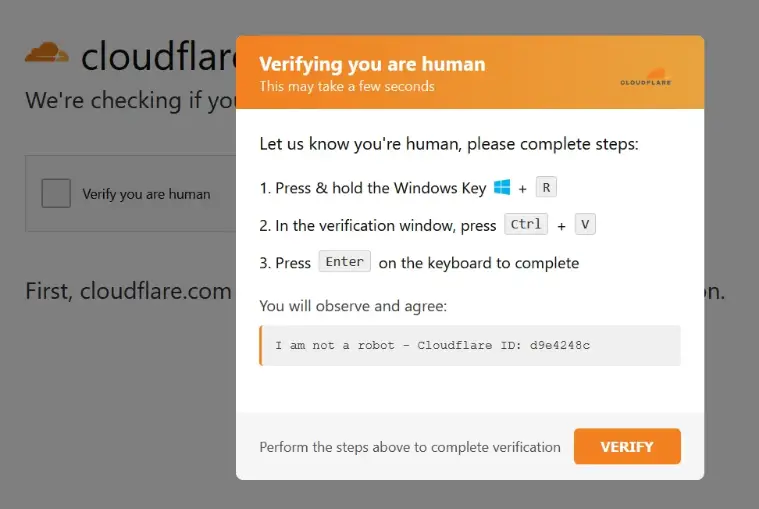
The Fake Cloudflare CAPTCHA scam is a dangerous cyberattack where hackers create fake “Verify you are human” pages that look like legitimate verification systems from Cloudflare.
Instead of verifying users, these pages trick victims into running malicious commands on their own computers—leading to malware infections, credential theft, and system compromise.
The fake Cloudflare CAPTCHA scam is a social engineering attack where users are instructed to copy and run malicious commands (often via PowerShell) disguised as a verification step. This allows hackers to install malware without traditional downloads.
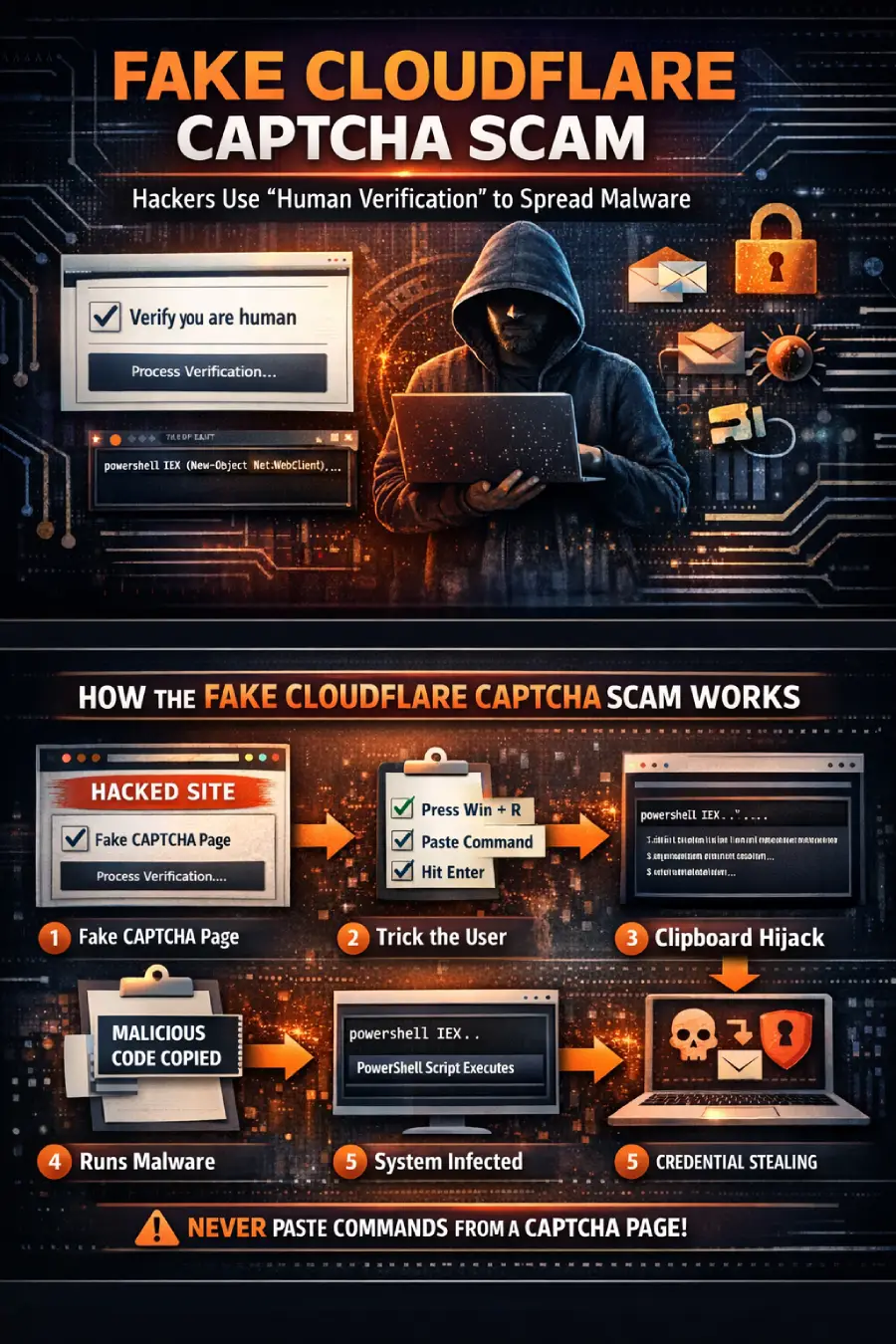
How the Fake CAPTCHA Attack Works
1. Compromised Website Displays Fake CAPTCHA
Attackers inject scripts into legitimate websites (often outdated WordPress sites), showing a fake Cloudflare verification page.
2. User Is Given Suspicious Instructions
Instead of clicking a checkbox, the page tells users to:
- Press Win + R
- Paste a command
- Press Enter
This is your first major red flag.
3. Clipboard Hijacking Occurs
The website secretly copies a malicious script to your clipboard.
4. PowerShell Executes Malware
The pasted command uses PowerShell to:
- Download hidden payloads
- Execute them directly in memory
- Avoid antivirus detection
5. System Gets Compromised
The malware may:
- Steal login credentials
- Access browser cookies
- Capture crypto wallets
- Install backdoors
What Is a ClickFix Attack?
The technique used in this scam is known as a ClickFix attack.
It manipulates users into fixing a fake issue by performing harmful actions themselves—effectively bypassing browser and OS security protections.
Why This Scam Is So Dangerous
Looks 100% Legitimate
Attackers mimic real CAPTCHA designs from Cloudflare, making it hard to detect.
No File Download Required
This attack uses fileless malware, meaning:
- No downloads
- No suspicious files
- Harder detection
You Execute the Malware Yourself
Since users manually run the command:
- Security warnings are bypassed
- Permissions are granted unknowingly
Large-Scale Campaigns
Security researchers have identified hundreds of infected websites, showing this is a widespread and ongoing attack.
Common Malware Delivered
These fake CAPTCHA attacks often deliver:
- Infostealers (steal saved passwords & browser data)
- Crypto wallet stealers
- Remote access trojans (RATs)
- Multi-stage loaders
Some well-known malware families include:
- Vidar Stealer
- StealC
How to Identify a Fake CAPTCHA
Watch for these warning signs:
- CAPTCHA asks you to run commands
- Instructions include Win + R
- Requests to paste or execute code
- Unusual or complex “verification” steps
- Appears unexpectedly on normal websites
Rule: A real CAPTCHA will NEVER ask you to run system commands.
How to Protect Yourself
1. Never Run Commands from Websites
If a page asks you to paste code into your system leave immediately.
2. Use Strong Security Software
Install:
- Antivirus/EDR tools
- Browser protection extensions
3. Keep Your System Updated
Update regularly:
- OS
- Browsers
- Plugins (especially WordPress)
4. Disable Unnecessary Script Execution
Advanced users can restrict PowerShell execution policies.
5. Monitor Your Accounts
Watch for:
- Suspicious logins
- Unknown devices
- Password reset alerts
FAQs
Q1. Is Cloudflare CAPTCHA safe?
Ans. Yes, legitimate CAPTCHA systems from Cloudflare are safe. However, attackers create fake versions to trick users.
Q2. What happens if I run the command?
Ans. Your system may get infected with malware that steals data, passwords, and sensitive information.
Q3. How do I know if a CAPTCHA is fake?
Ans. If it asks you to run commands, open Run dialog, or paste code it is fake.
Q4. Can antivirus detect this attack?
Ans. Not always. Fileless malware can bypass traditional antivirus detection.
Final Thoughts
The fake Cloudflare CAPTCHA scam shows how cybercriminals are shifting toward human-focused attacks instead of technical exploits.
By exploiting trust in familiar platforms like Cloudflare, attackers are successfully tricking users into compromising their own systems.
The best defense is simple: Never execute commands from a website no matter how legitimate it looks.