Introduction: The CAPTCHA You Should Never Trust
You’ve seen them thousands of times. A familiar orange-and-white Cloudflare screen appears, asking you to verify you’re human before accessing a website. You click, you move on, no harm done right?
Not anymore.
Cybercriminals have weaponized the very security tools we trust most. Fake Cloudflare CAPTCHA pages, designed to look pixel-perfect like the real thing, are now one of the most effective malware delivery mechanisms in the world. And the numbers are alarming: ClickFix attacks the technique behind these scams surged 517% in the first half of 2025 alone, now driving nearly half of all intrusions tracked by Microsoft.
What makes this attack so dangerous isn’t brute force or exotic exploits. It’s psychology. Attackers impersonate Cloudflare because Cloudflare is one of the most recognized and trusted names on the internet, protecting millions of websites globally. When users see that familiar logo and interface, their guard drops completely and that’s exactly what the attackers are counting on.
This article breaks down exactly how the fake Cloudflare CAPTCHA scam works, which malware it delivers, and what you can do right now to protect yourself. If you want the short version first, PostDune’s earlier explainer on the fake Cloudflare CAPTCHA scam covers the same core mechanics in a quicker read.
What Is the Fake Cloudflare CAPTCHA Scam?
The fake Cloudflare CAPTCHA scam also known as the ClickFix attack or Clear Fake campaign —is a sophisticated social engineering attack that has grown dramatically since its first documented appearance in early 2024.
In a genuine Cloudflare security check (called Cloudflare Turnstile), visitors simply click a checkbox or wait a brief moment while Cloudflare silently verifies their browser signals. Nothing unusual is required. The process is passive.
A fake CAPTCHA page, however, adds a critical twist: after presenting a convincing replica of the Cloudflare interface, it instructs the user to take a series of manual steps pressing keyboard shortcuts, opening system tools, and pasting commands under the pretense that these steps are part of an “advanced verification process.”
Those steps are not verification. They are a malware installation process that the victim carries out themselves.
Legitimate vs. Fake: Spot the Difference
| Feature | Legitimate Cloudflare Verification | Fake Cloudflare CAPTCHA Scam |
|---|---|---|
| User action required | Click checkbox or wait passively | Press Win+R, open Terminal, paste commands |
| Clipboard manipulation | None | Silently copies malicious command to clipboard |
| Instructions given | “Verifying you are human…” | “Press Windows + R, then Ctrl+V, then Enter” |
| System access needed | None | Opens Windows Run dialog or macOS Terminal |
| File downloads | None | Downloads and executes malware payload |
| Page design | Hosted on Cloudflare’s own domain | Hosted on compromised or typo-squatted domains |
| Keyboard shortcuts prompted | Never | Always (Win+R, Ctrl+V, Enter, or similar) |
| Works on macOS | Yes (same passive check) | Yes (Terminal paste variant) |
| Result | Accesses the website normally | Installs infostealer, RAT, or ransomware |
| Risk level | Zero | Extremely high |
How the Scam Works: Step-by-Step Attack Chain
The elegance of this attack lies in its simplicity. No vulnerability is exploited, no zero-day is needed the victim does all the work.
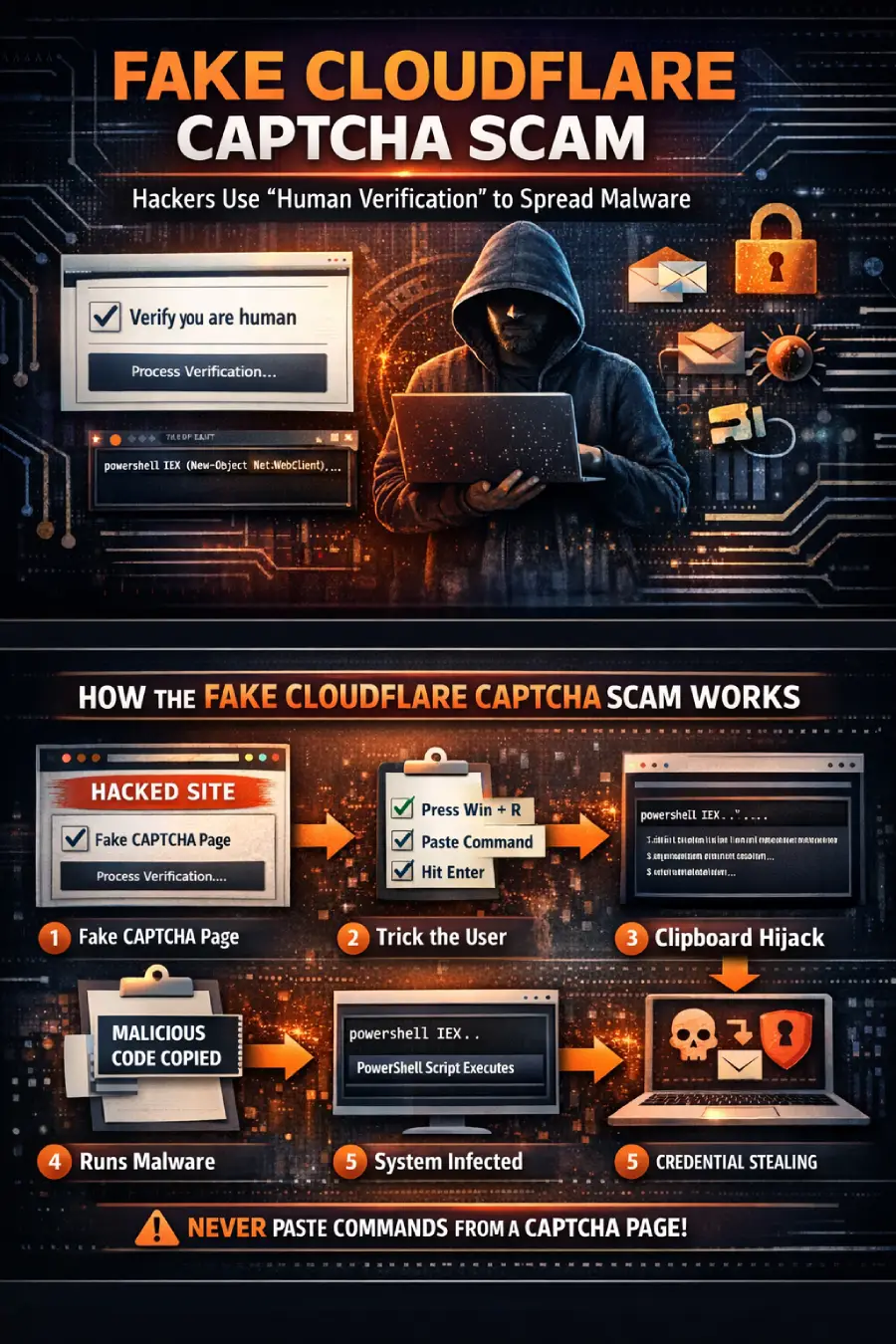
1. The Lure. The victim arrives at a compromised legitimate website, a malvertising redirect, a phishing email link, or a typo-squatted domain. The page appears to be a normal website but is injected with malicious JavaScript.
2. The Fake CAPTCHA Appears. The injected script displays a convincing Cloudflare verification overlay, complete with the Cloudflare logo, orange color scheme, and “Verify you are human” message. The page looks indistinguishable from the real thing.
3. Clipboard Hijacking. The moment the user clicks “I am not a robot,” the hidden JavaScript silently copies a malicious PowerShell or Bash command to the user’s clipboard. The user sees nothing unusual.
4. Fake Instructions. The page then presents a second set of instructions, claiming that an “additional verification step” is required due to the user’s browser. It instructs them to press Windows + R (opens the Run dialog), press Ctrl + V (pastes the hidden command), and press Enter (executes it).
5. Command Execution. The user, believing they are completing a security check, runs the command. The command is typically obfuscated to hide its true purpose. It may appear to show a harmless “verification ID” at the end for example, “Cloudflare Verification ID: 715921” while the actual malicious payload runs silently in the background.
6. Payload Delivery. The executed command contacts an attacker-controlled server, downloads the final malware payload, and installs it in memory or on disk, often avoiding traditional antivirus detection entirely.
7. Persistence and Exfiltration. The malware establishes persistence often via Windows startup folders or scheduled tasks then begins stealing passwords, browser data, cryptocurrency wallets, and credentials, uploading everything to the attacker’s servers in near real time.
Why Users Fall for the Scam
1. Brand Trust
Cloudflare is one of the most ubiquitous names in web infrastructure. Hundreds of millions of people encounter genuine Cloudflare security checks every day. The association between “Cloudflare = safe website protection” is deeply ingrained, making the impersonation extraordinarily effective.
2. Familiarity Breeds Complacency
Real CAPTCHAs are designed to be solved quickly and without much thought. Users have been conditioned to click through verification screens automatically. This habit makes them far less likely to pause and question why a CAPTCHA suddenly needs them to open a system dialog.
3. False Authority
The page presents itself as an authoritative security system one the user has no power to skip or dismiss. The framing (“Your browser security level is too low,” “Advanced verification required”) creates a sense of urgency and technical necessity.
4. The Commands Are Hidden in Plain Sight
Because the malicious PowerShell command is long, the visible portion pasted into the Run dialog often shows only the fake verification text at the end not the dangerous code preceding it. Users see “Cloudflare Verification ID” and believe it’s legitimate.
5. Social Proof and Context
The attacks are frequently delivered through trusted websites that have been compromised including major news portals, educational platforms, and booking services lending further credibility to the fake prompt.
Common Malware Distributed Through Fake CAPTCHA Pages
Lumma Stealer is described by Microsoft as the single most prolific payload delivered through ClickFix campaigns. It operates as a Malware-as-a-Service (MaaS), meaning criminal groups rent it out with no technical expertise required. Lumma targets saved passwords, browser cookies, cryptocurrency wallets, and two-factor authentication tokens. It was discovered in 2022 and has continued to evolve, even bouncing back rapidly after a law enforcement takedown in May 2025.
Remote Access Trojans (RATs). NetSupport RAT is among the most commonly deployed payloads in fake CAPTCHA campaigns. Once installed, it gives attackers persistent, real-time access to the compromised system, enabling keylogging, screen capture, file theft, and lateral movement across corporate networks.
DarkGate is a sophisticated multi-function malware that combines information stealing, remote access, cryptocurrency mining, and ransomware delivery. It has been widely documented as a ClickFix campaign payload.
Information Stealers. Beyond Lumma, campaigns distribute Vidar Stealer, AsyncRAT, Latrodectus, DanaBot, and the cross-platform Atomic macOS Stealer. These tools immediately exfiltrate browser saved passwords, email credentials, session cookies, and financial data sometimes within seconds of installation.
Cryptocurrency Wallet Theft Malware. The Infiniti Stealer, discovered in early 2026 targeting macOS users, focuses specifically on cryptocurrency theft, capable of targeting over 200 browser-based wallet extensions and 18 desktop wallet applications. SmartRAT (also called Banana RAT) is another example targeting financial data from banking sites.
The Dangerous “Windows + R” Trick Explained
The Windows Run dialog (Win + R) is a legitimate Windows utility designed to quickly launch applications and commands. It executes whatever is typed into it with the permissions of the currently logged-in user no special privileges needed for many dangerous actions.
When an attacker’s PowerShell command is pasted and run through this dialog, it can:
- Download malware silently from a remote server using trusted Windows utilities like
mshta.exeorpowershell.exe - Execute entirely in memory, leaving minimal traces on disk that would trigger antivirus software
- Disable security tools by modifying Windows Defender settings
- Establish persistence by creating scheduled tasks or startup entries
- Communicate with command-and-control servers using encrypted channels
A typical command might look like this in concept: it first launches a trusted Windows utility, which fetches a disguised script file from an attacker-controlled URL, which in turn runs a full PowerShell payload entirely in memory. The obfuscation means even technically savvy users often can’t read the command’s true intent at a glance.
On macOS, the equivalent tactic uses the Terminal application users are asked to paste a Bash command, achieving the same result through a different operating system’s native tools.
Real-World Examples of Fake CAPTCHA Malware Campaigns
The Retail Redirect (October 2024). ReliaQuest documented a campaign in which a retail trade customer was redirected from a legitimate industry news site to a fake Cloudflare CAPTCHA hosted on a compromised home design website. The campaign doubled in frequency between September and December 2024.
The Booking Site Attack (January 2025). G DATA analysts uncovered a Lumma Stealer campaign embedded in fake travel itinerary pages. Users visiting what appeared to be hotel booking confirmations were served fake CAPTCHA overlays that silently installed the infostealer.
The Microsoft Email Campaign (April 2025). Microsoft Threat Intelligence observed a large-scale email campaign targeting organizations across Canada, consisting of thousands of phishing emails that directed recipients to ClickFix-enabled landing pages using Ether Hiding techniques to fetch the fake CAPTCHA code from blockchain infrastructure.
The ClearFake Mass Infection (2025–2026). One ClearFake-variant campaign reportedly infected over 147,521 systems between late August 2025 and early 2026, according to reporting by The Hacker News representing one of the largest single fake CAPTCHA campaigns ever documented.
The macOS Infiniti Stealer Campaign (Early 2026). Malwarebytes researchers discovered a ClickFix campaign specifically targeting Mac users via update-check[.]com, delivering a Python-based infostealer designed to drain cryptocurrency wallets. This marked a significant expansion of the technique beyond Windows.
The UCL Education Sector Incident (October 2025). University College London’s Information Security Group investigated multiple incidents in which staff and students unknowingly executed fake CAPTCHA instructions on trusted websites highlighting that even technically educated users in academic environments are vulnerable.
Warning Signs of a Fake Cloudflare Verification Page
If you encounter any of the following, stop immediately and close the browser tab:
- You’re asked to press keyboard shortcuts. Real Cloudflare checks never require Win+R, Ctrl+V, or any keyboard action beyond a simple click.
- Instructions to open the Run dialog or Terminal. No legitimate security check ever asks you to open a system command interface.
- You’re told to paste something. Clipboard paste instructions for verification are a universal red flag.
- The URL is not on cloudflare.com. Legitimate Cloudflare checks occur within the page’s own domain context, not on a separate cloudflare.com popup. Check the address bar carefully.
- The page appeared as an unexpected overlay. Genuine verification pages are typically integrated into the page flow, not sudden full-screen overlays.
- Multiple “steps” for verification. Real CAPTCHAs are one-step processes. Multiple steps are a manipulation technique.
- Urgent or threatening language. Phrases like “Your browser is blocked,” “Verification required to continue,” or “Security threat detected” are pressure tactics.
- The page appeared after clicking an ad or email link. Malvertising and phishing are the most common delivery vectors for these attacks.
- A “verification code” or “ID number” is displayed after you paste. This is cosmetic misdirection the malicious command already ran before you saw the code.
- The site wasn’t the one you intended to visit. Redirects through compromised or typo-squatted domains are a core part of the attack chain.
- The page asks you to disable your antivirus. Any such request is an immediate dealbreaker.
- macOS users: Terminal is referenced. No website verification ever requires macOS Terminal commands.
Risks and Consequences
The consequences of executing a malicious CAPTCHA command can range from inconvenient to catastrophic:
- Password theft. Infostealers like Lumma extract every saved password from every browser profile, email client, and password manager they can access, typically within seconds of execution.
- Financial fraud. Stolen banking credentials and session cookies allow attackers to log into accounts and initiate unauthorized transfers before victims are even aware of the compromise.
- Identity theft. Exfiltrated personal documents, scanned IDs, tax records, and email archives provide attackers with everything needed for full identity fraud.
- Corporate network breaches. A single infected employee device can serve as a launchpad for lateral movement across an entire enterprise network, accessing internal systems, stealing intellectual property, and planting further malware.
- Ransomware infections. RATs installed through fake CAPTCHAs are frequently used to deploy ransomware at a later stage, once attackers have fully mapped the network and identified high-value targets.
- Cryptocurrency loss. Wallet-targeting malware can drain crypto holdings permanently. Unlike bank transfers, most cryptocurrency transactions are irreversible.
How to Protect Yourself
For Individuals
- Never execute commands from a web page. No legitimate website will ever ask you to open your terminal, Run dialog, or command prompt as part of a verification process. If it does, it’s an attack.
- Use a password manager, so even if credentials are exfiltrated, they aren’t easily usable without the master password and two-factor authentication.
- Enable multi-factor authentication (MFA) on all important accounts even if passwords are stolen, MFA provides a critical second barrier.
- Keep your browser and OS updated. Many secondary attack components exploit known vulnerabilities in outdated software.
- Install a reputable endpoint security solution that includes behavioral detection signature-based antivirus alone often misses in-memory payloads.
- Be skeptical of unexpected CAPTCHAs, especially on sites you visit regularly that have never shown them before.
For Businesses and IT Teams
- Implement application whitelisting to prevent unauthorized execution of scripts and commands via PowerShell and
mshta.exe. - Restrict PowerShell execution policy to prevent unsigned scripts from running.
- Deploy DNS filtering to block known malicious domains used as command-and-control servers.
- Conduct regular security awareness training that specifically covers ClickFix and fake CAPTCHA attacks, including simulated phishing exercises.
- Monitor for anomalous clipboard events and Run dialog usage via endpoint detection and response (EDR) tools.
- Implement least-privilege access, so that if an account is compromised, the blast radius is limited.
- Enable PowerShell script block logging to capture and alert on obfuscated command execution.
What to Do If You Executed a Malicious Command
If you realize you may have followed the instructions on a fake CAPTCHA page, act immediately.
Immediate steps (do these first):
- Disconnect from the internet disable Wi-Fi and unplug ethernet to cut off the malware’s communication with attacker servers.
- Do not log in to any accounts on the infected device until it has been cleaned.
- Note the time of the incident this helps forensic investigation.
- Alert your IT or security team immediately if this is a work device.
Recovery steps:
- Run a full scan with a reputable endpoint security tool (in offline/safe mode if possible).
- Change all passwords from a separate, clean device prioritize banking, email, and any cryptocurrency accounts.
- Revoke active browser sessions on all major accounts (Google, Microsoft, Apple, etc.).
- Enable or review MFA on all critical accounts.
- Contact your bank to flag potential fraudulent activity and consider a temporary account freeze.
- Freeze your credit if you believe personal identification documents were accessible on the device.
- Consider a full OS reinstall sophisticated infostealers can persist even after apparent removal.
- Report the incident to your national cybersecurity authority (e.g., CISA in the US, NCSC in the UK, CERT-In in India).
Future Trends: The Evolving Threat Landscape
AI-powered social engineering. Nation-state actors including Iran-linked MuddyWater and Russia-linked APT28 have already adopted ClickFix techniques. Researchers have noted that some fake CAPTCHA pages now use AI-generated code, enabling attackers to rapidly create and iterate new campaign variants at scale with minimal effort.
Cross-platform expansion. Once primarily a Windows threat, fake CAPTCHA attacks have now been documented targeting macOS users via Terminal commands, and researchers anticipate Linux and mobile variants as the technique matures.
Blockchain-based payload delivery. The EtherHiding technique documented in Microsoft’s April 2025 research embeds attack instructions in public blockchain transactions, making them extremely difficult for security teams to take down through traditional domain blocking.
Dark web commoditization. ClickFix attack kits are increasingly available on dark web marketplaces, lowering the technical bar for new criminals and accelerating the pace of campaigns.
Integration with nation-state operations. The adoption of a previously criminal technique by sophisticated state-sponsored threat actors signals that fake CAPTCHA attacks are no longer just opportunistic crime they’re a mature, trusted component of high-stakes cyber espionage.
Conclusion
The fake Cloudflare CAPTCHA scam is a masterclass in social engineering not because it’s technically complex, but because it’s psychologically devastating. It weaponizes our trust, our habits, and our haste, turning a routine moment of clicking through a security prompt into a moment of self-inflicted compromise.
The good news is that this attack has a clear, identifiable signature: no legitimate security check will ever ask you to press keyboard shortcuts, open a system dialog, or paste a command. Knowing this one rule and acting on it is enough to protect yourself from the vast majority of fake CAPTCHA campaigns.
Stay skeptical. Pause before you paste. And if something about a “verification” prompt feels unusual, trust that instinct. In cybersecurity, a moment of friction is almost always worth a lifetime of protection.
Frequently Asked Questions
What is a fake Cloudflare CAPTCHA scam? It’s a social engineering attack that displays a convincing replica of a Cloudflare security verification page. Instead of simply checking whether you’re human, it tricks you into running a malicious command on your own computer, which silently installs malware.
How do I know if a Cloudflare CAPTCHA page is real? A real Cloudflare verification only requires a simple click or brief wait it never asks you to press keyboard shortcuts, open your Run dialog (Win+R), launch Terminal, or paste any command. If it asks for any of these steps, it’s fake.
What malware is typically installed through these fake CAPTCHA pages? The most common payloads include Lumma Stealer (the most prevalent), NetSupport RAT, DarkGate, Vidar Stealer, AsyncRAT, and for macOS targets the Infiniti Stealer and Atomic macOS Stealer.
Can macOS users be targeted by this scam? Yes. While the attack originally targeted Windows users via the Run dialog, variants targeting macOS users through Terminal commands have been documented since early 2026, particularly designed to steal cryptocurrency wallet data.
What happens if I accidentally ran the command? Disconnect from the internet immediately, don’t log in to any accounts on that device, change your passwords from a separate clean device, contact your IT security team, and consider reporting to your national cybersecurity authority. A full OS reinstall may be necessary.
How do attackers get these fake pages in front of me? Common delivery methods include compromised legitimate websites (injected with malicious JavaScript), malvertising, phishing emails, social media links, SEO poisoning, and typo-squatted domains that impersonate real websites.
Why do attackers specifically impersonate Cloudflare? Cloudflare is one of the most widely recognized web security brands in the world. Its verification screens appear on millions of websites daily, making users conditioned to trust and quickly comply with them dramatically increasing the success rate of the scam.
Can my antivirus protect me from this attack? Traditional signature-based antivirus often misses these attacks because the malicious code runs in memory rather than as a file on disk, and the initial vector is the user themselves executing the command. Behavioral detection via modern EDR tools offers better protection, but user awareness remains the most effective defense.
Are businesses at higher risk than individuals? Both are at risk, but businesses face amplified consequences. A single compromised employee device can lead to lateral movement across the entire corporate network, data exfiltration, and ransomware deployment. Nation-state actors have also adopted this technique for targeted espionage.
How fast is this type of attack growing? Extremely fast. ClickFix attacks surged 517% in the first half of 2025 alone. Between October and December 2024, researchers observed nearly twice as many fake CAPTCHA websites per month compared to September 2024. One campaign variant infected over 147,000 systems in a single campaign window.