For years, measuring SEO success came down to a familiar checklist: organic traffic, keyword rankings, click-through rate, bounce rate, conversions, impressions. Those numbers still matter but on their own, they no longer tell the whole story.
People increasingly get their answers through conversational AI, generative summaries, and AI-powered search experiences. In a lot of those cases, the user never clicks through to a website at all they get what they needed directly in the answer. That raises a real question for anyone tracking performance: how do you measure visibility when a growing share of interactions never touch your site?
The short answer is that your analytics strategy needs to widen. Rather than watching traditional SEO metrics alone, you also need to track AI-related visibility, referral traffic where it exists, engagement quality, and brand presence wherever it can actually be measured.
This guide walks through how to evaluate your site’s performance across the AI search landscape using Google Analytics 4 (GA4), Google Search Console, Bing Webmaster Tools, and a few practical measurement habits worth building into your workflow.
If AI search is still a new concept for you, it’s worth starting with PostDune’s Complete Guide to AI Search in 2026, What Is AI Search?, and How AI Search Works the concepts there will make the analytics side much easier to interpret.
Why AI Search Analytics Matters
Most site owners still boil success down to one question: “Did my organic traffic go up?” In an AI-first search landscape, that question is too narrow to be useful on its own.
Picture this: an AI assistant summarizes your article, names your brand as the source, and thousands of people read that summary. Only a fraction click through. Direct traffic barely moves but your content just influenced a large audience and reinforced brand trust in the process.
That’s the gap traditional reporting misses. Modern measurement needs to look past traffic and account for influence that doesn’t always leave a clean trail in your analytics.
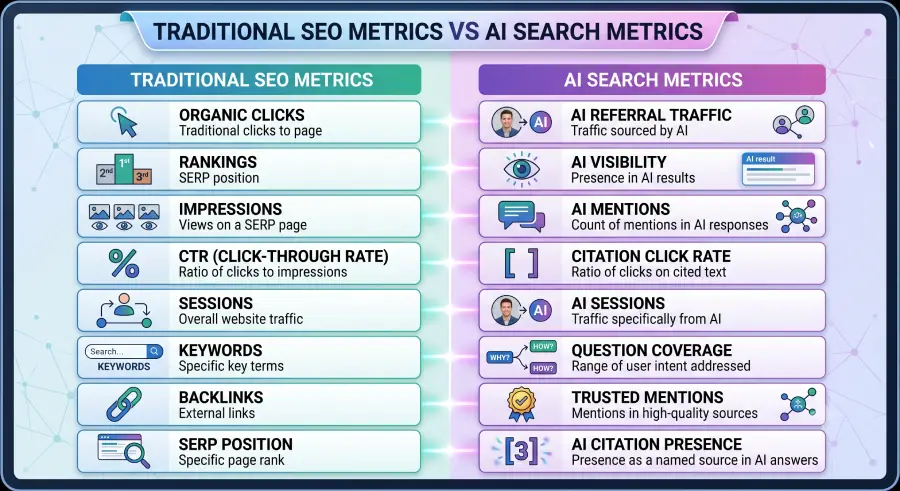
Traditional SEO Metrics vs AI Search Metrics
Traditional SEO Metrics vs. AI Search Metrics
| Traditional SEO | AI Search Analytics |
| Organic sessions | AI referral sessions |
| Keyword rankings | AI visibility |
| SERP impressions | Brand mentions in AI responses (where observable) |
| Click-through rate | Citation click rate (when available) |
| Bounce rate | Engagement after AI referrals |
| Backlinks | Trusted references and citations |
| Page rankings | Topic authority |
AI search opens up new discovery paths for your content even when those interactions resist tidy measurement.
What Counts as AI Search Traffic?
AI search traffic describes visits that originate when a user clicks through from an AI-powered search or conversational tool. That can include traffic from:
- AI search experiences that surface clickable source links
- AI assistants with browsing capabilities
- AI-enabled search interfaces
- Other platforms that display website citations
How that traffic shows up in your reporting depends heavily on how each platform passes (or doesn’t pass) referral data.
AI Referral Traffic, Explained
A referral happens whenever someone lands on your site by following a link from somewhere else. With AI-powered search, that link might come from:
- AI-generated answer pages that include citations
- AI chat interfaces that surface source links
- AI search summaries with clickable references
Depending on the platform, these visits might show up as referral traffic, get lumped into organic search, or land somewhere else entirely. Not every AI interaction produces a traceable referral that’s just a current limitation worth planning around.
AI Mentions vs. AI Citations
These two terms get used interchangeably, but they describe different things.
AI Mention
An AI system references your brand, product, or website inside its answer without necessarily linking to it. For example: “According to PostDune, Answer Engine Optimization focuses on creating content that directly answers user questions.” A mention builds visibility, but it may not send a single visitor your way.
AI Citation
An AI system links directly to your page, or clearly attributes information to it something like “Source: PostDune – Answer Engine Optimization Guide.” Citations are far more likely to translate into measurable traffic, since there’s an actual link for the user to click.
Can Every AI Mention Be Measured?
No and this is one of the most important realities of AI search analytics.
Some systems provide clickable citations, pass along referral data, and allow reasonably clean attribution. Others summarize your content without a link, mention your brand without generating a visit, or resolve the entire answer inside their own interface.
There’s currently no single metric that captures every AI interaction. The realistic approach is combining multiple data sources and understanding what each one can and can’t tell you.
Key Metrics to Track
Rather than fixating on one number, build a balanced view across a handful of indicators.
1. Organic Traffic
Still worth tracking closely it remains one of the clearest overall signals of search performance.
2. AI Referral Traffic
Identify the visits that do come with AI-platform referral data attached, and watch the trend over time rather than reacting to single-day spikes or dips.
3. Brand Visibility
Watch for growth in branded searches, direct traffic, mentions across the web, and overall content engagement these often move even when AI referral traffic itself stays flat.
4. Engagement Metrics
- Average engagement time
- Pages per session
- Scroll depth
- Returning visitors
- Conversions
5. Conversion Metrics
- Newsletter sign-ups
- Contact form submissions
- Product purchases
- Downloads
- Lead generation
Preparing Your Analytics Foundation
Before digging into individual reports, confirm the basics are actually in place:
- GA4 properly installed
- Google Search Console configured
- Bing Webmaster Tools verified
- Conversion tracking enabled
- Meaningful events configured in GA4
- Consistent UTM tagging on campaigns
- Clear, specific reporting goals
A solid measurement foundation makes every AI-related trend far easier to interpret correctly.
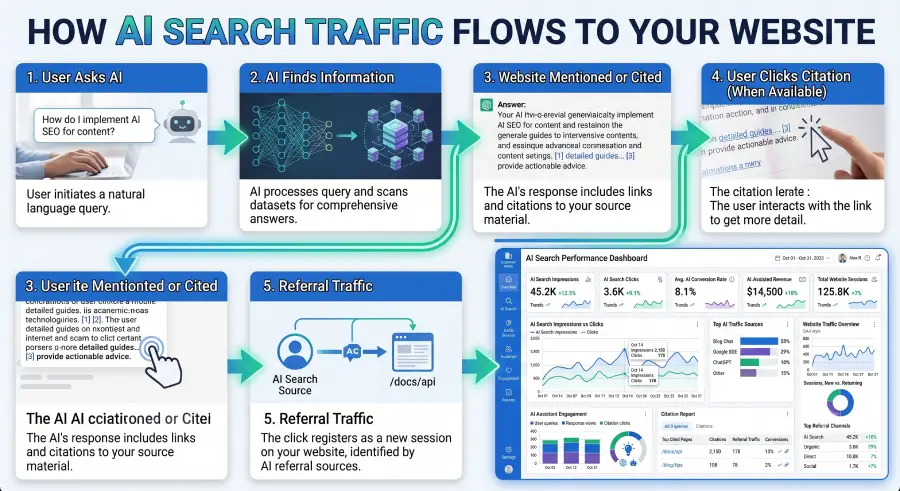
How to Track AI Search Traffic With GA4
GA4 doesn’t have a dedicated “AI Search” report but it’s still one of the most useful tools available for understanding AI-related referral traffic and behavior, when that data is available. The key is knowing where to look and how to read what you find.
Step 1: Confirm GA4 Is Fully Configured
- Enhanced Measurement enabled
- Page view tracking
- Scroll tracking
- Outbound click tracking
- Site search tracking (if applicable)
- Conversion events configured
- Key events marked correctly
- Cross-domain tracking (if needed)
Step 2: Check Traffic Acquisition Reports
Reports → Acquisition → Traffic Acquisition
- Sessions
- Users
- Engaged sessions
- Average engagement time
- Conversions
- Event count
If an AI platform passes referral information, it may surface here — depending entirely on how that platform attributes traffic.
Step 3: Review Referral Traffic Specifically
Same report, but switch the primary dimension to Session source / medium. Look for anything that could indicate AI-driven visits, and compare across weeks and months rather than reacting to any single day.
Step 4: Build AI Referral Comparisons
GA4 comparisons let you set referral traffic, organic search, direct traffic, and new vs. returning users side by side — useful for spotting shifts after publishing AI-optimized content.
Step 5: Watch Your Landing Pages
Reports → Engagement → Landing Page
Which pages pull the most visitors? Which AI-focused guides perform best? Which pages hold attention, and which convert? Comparing performance across your core AI Search articles will show you which topics genuinely resonate.
Using Google Search Console
Search Console doesn’t have a separate report for AI-generated experiences either, but it’s still essential for tracking underlying search performance — impressions, clicks, average position, queries, indexed pages, and coverage issues.
Performance Report
Search Results → Performance
- Total clicks
- Total impressions
- Average CTR
- Average position
Compare these numbers before and after any significant update to your important AI Search content.
Analyze Search Queries
Which AI-related terms are generating impressions? Are new, more conversational queries starting to appear? Which pages get strong visibility but weak CTR? These questions point directly to your next round of content improvements.
Monitor Index Coverage
- Indexed pages
- Excluded pages
- Crawl issues
- Mobile usability
- Page experience
Technical problems here can quietly cap your discoverability, no matter how strong the content itself is.
Using Bing Webmaster Tools
Bing Webmaster Tools is worth checking regularly, especially since Microsoft has woven AI features throughout its own search ecosystem. Track search performance, crawl status, indexing, backlinks, and overall site health — and compare against your Google data to spot differences in audience behavior across platforms.
Build a Custom AI Search Dashboard
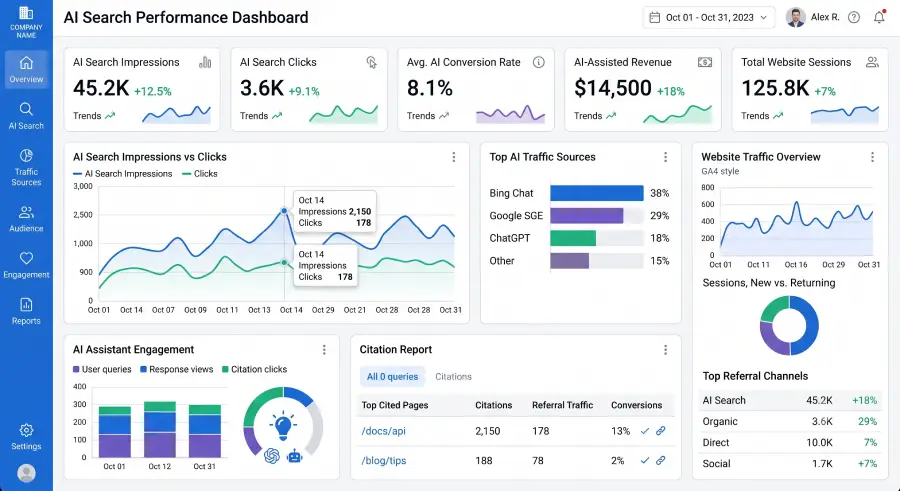
Rather than jumping between separate reports, pull your most important metrics into one dashboard.
Traffic — organic sessions, referral sessions, new and returning users
Engagement — average engagement time, pages per session, scroll depth, engaged sessions
Content — top landing pages, top-performing AI Search articles, internal link clicks, conversion rate
Technical — indexed pages, crawl errors, Core Web Vitals, broken links
Reviewing these together, rather than in isolation, gives a far more complete read on how your site is actually performing.
AI Search KPIs Worth Monitoring
Visibility — organic impressions, branded searches, indexed pages
Engagement — time on page, engaged sessions, scroll depth, returning visitors
Authority — backlinks, referring domains, internal link coverage
Business outcomes — leads, sales, newsletter subscriptions, downloads, contact form submissions
These KPIs are what actually tie content performance back to business results.
Measuring Brand Growth Beyond Direct Traffic
Not every AI interaction sends someone to your site — so watch the indirect signals too:
- Increased branded searches
- More direct traffic
- Higher returning-visitor rates
- More social sharing
- Growth in backlinks
- Growing newsletter subscriptions
These often reflect rising awareness driven by helpful content, even when it doesn’t show up as a clean referral.
Understanding the Current Limitations
AI search analytics is still a moving target. Keep a few things in mind:
- Not every AI interaction can be measured
- Referral attribution varies significantly by platform
- Some AI systems summarize content without passing any referral data
- Analytics tools are still catching up to how AI search actually works
Don’t build conclusions on a single metric. Combine sources and treat any one number as part of a bigger picture.
A Simple Monthly Reporting Workflow
Week 1 — Review GA4 acquisition reports and compare referral traffic.
Week 2 — Analyze Search Console performance and flag new queries.
Week 3 — Review content engagement and update internal links.
Week 4 — Refresh outdated content, record KPI trends, and plan the next round of improvements.
A consistent rhythm like this surfaces long-term patterns that daily glances at analytics will always miss.
Best Practices for Measuring AI Search Performance
Tracking AI search performance isn’t just about counting visits — it’s about understanding how AI-driven discovery contributes to visibility, engagement, and business outcomes over time. A few habits that make that easier:
Track trends, not daily swings. AI referral traffic can be noisy day to day. Compare month over month, quarter over quarter, and year over year instead.
Measure outcomes, not just visits. Track whether AI-driven traffic actually subscribes, downloads, purchases, or converts — traffic alone isn’t the goal.
Review your top landing pages monthly. Identify which pages are gaining traffic or engagement, and keep improving them.
Keep content fresh. AI systems tend to favor accurate, current information — refresh statistics, screenshots, and examples on a schedule.
Analyze performance by topic cluster, not single articles. Comparing entire clusters (AI Search, GEO, AEO, Analytics) shows which themes carry your strategy.
Track internal link engagement. See which internal links actually get clicked, and where readers tend to drop off.
Watch branded search growth. Rising searches for your brand name are a strong signal of growing authority.
Pay attention to returning visitors. They’re a solid proxy for trust and content quality.
Build a consistent monthly report. Same format, same metrics, every month — consistency is what makes trends visible.
Look for content gaps. Use your analytics to find questions your audience is asking that you haven’t answered yet.
Prioritize your evergreen content. Improving what already works often beats constantly publishing something new.
Monitor technical health regularly. Crawl errors, broken links, and weak Core Web Vitals quietly cap discoverability.
Compare across search platforms. Google, Bing, and AI-powered experiences each send different kinds of visitors.
Aim for topic authority over keyword volume. Being the most trusted resource on a subject compounds more than chasing every related keyword.
Pull from multiple data sources. GA4, Search Console, Bing Webmaster Tools, server logs, and brand-monitoring tools each fill in different gaps.
Log major site changes. New content, redesigns, schema updates — record the date so you can correlate changes with results later.
Avoid vanity metrics. A big traffic number means little if nobody engages or converts.
Get your team aligned. If multiple people publish content, make sure everyone understands your standards and reporting cadence.
Treat this as ongoing, not a one-time project. AI search keeps evolving, and your measurement approach should keep pace with it.
AI Search Dashboard Template
| Category | Metrics |
| Traffic | Organic sessions, referral sessions, direct traffic |
| Search Visibility | Impressions, clicks, average position |
| Engagement | Engagement time, scroll depth, pages per session |
| Content | Top landing pages, updated articles, internal link clicks |
| Authority | Referring domains, backlinks, brand searches |
| Conversions | Leads, sales, newsletter sign-ups, downloads |
| Technical | Indexed pages, crawl issues, Core Web Vitals |
A monthly look at this table gives you a genuinely balanced read on performance — not just a traffic number in isolation.
Common AI Search Analytics Mistakes
Expecting perfect attribution. Not every AI interaction produces measurable referral traffic — and it likely never will.
Measuring traffic only. Engagement and conversions matter more than raw visit counts.
Ignoring content upkeep. Publishing without maintaining what you’ve already published erodes long-term value.
Tracking too many KPIs. A focused, manageable set beats a dashboard nobody actually reads.
Forgetting internal links. They quietly support both users and search visibility.
Assuming rankings tell the whole story. Visibility now includes AI-generated answers and citations — not just SERP position.
Monthly AI Search KPI Checklist
Visibility — organic impressions, organic clicks, indexed pages, branded searches
Traffic — organic sessions, referral sessions, direct traffic, returning visitors
Engagement — average engagement time, scroll depth, pages per session, engaged sessions
Business — leads, sales, newsletter subscriptions, contact form submissions
Technical — page speed, mobile usability, crawl health, Core Web Vitals
Frequently Asked Questions
Can Google Analytics identify all AI search traffic?
No. GA4 can capture traffic when an AI platform passes referral information, but it can’t identify every AI interaction that touches your content.
Does Google Search Console report AI-generated answers separately?
Not currently. Keep monitoring standard performance reports and watch for future updates from Google.
Should I stop tracking keyword rankings?
No. Rankings are still useful — just weigh them alongside engagement, conversions, and overall content performance rather than on their own.
Which single metric matters most?
None of them, in isolation. A combination of visibility, engagement, conversions, and content quality gives the clearest picture.
How often should I review AI search performance?
Monthly works well for most sites, with a more thorough quarterly audit for your evergreen, high-value content.
Key Takeaways
- AI search measurement requires combining multiple data sources, not relying on one
- Traditional SEO metrics are still valuable, just no longer sufficient on their own
- Prioritize meaningful engagement and business outcomes over raw traffic
- Track trends over time instead of reacting to daily fluctuations
- Refresh content on a schedule to stay relevant to both readers and AI systems
- Build a dashboard that blends traffic, visibility, engagement, authority, and technical health
- Accept that some AI interactions simply can’t be measured directly yet
Conclusion
As AI-powered search keeps reshaping how people find information, the way you measure success has to evolve alongside it. Instead of leaning on rankings and clicks alone, build a wider view — one that accounts for content quality, engagement, referral traffic, topic authority, and real business impact.
No current tool captures every AI interaction, and it’s worth accepting that upfront. The most reliable approach is combining Google Analytics 4, Google Search Console, Bing Webmaster Tools, and other trusted sources, while staying realistic about what each one can and can’t tell you.
Once you’ve got measurement in place, it connects directly back to strategy — see PostDune’s guides on Generative Engine Optimization (GEO) and Answer Engine Optimization (AEO) for how to act on what your analytics are telling you, or AI Search Statistics 2026 for the broader industry context.