
AI has moved well past simple chatbot novelty into a genuinely different way of finding and interacting with information. Instead of typing a few keywords and browsing through several webpages, people can now ask a complete question in plain language and get a structured, conversational answer back in seconds.
ChatGPT Search built directly into ChatGPT has been one of the biggest drivers of that shift. It combines conversational AI with web search, letting people ask questions, get detailed answers, explore follow-ups, and pull in current information when it’s genuinely needed. Rather than acting like a traditional search engine that just lists webpages, it’s built around understanding what someone actually wants and responding accordingly.
Instead of running four separate searches “best mirrorless camera,” “mirrorless camera for beginners,” “best Sony camera under $1,200,” “Sony vs Canon mirrorless” someone could just ask: “I’m a beginner photographer with a budget of $1,200. Should I buy a Sony or Canon mirrorless camera, and which model would you recommend?” Instead of digging through review sites, ChatGPT Search organizes that into a clear comparison and keeps answering follow-ups naturally.
This is part of why so many people are changing how they search in the first place for more on that shift, see How AI Is Changing User Search Behavior in 2026.
This guide covers what ChatGPT Search actually is, how it works, its major features, real limitations, practical use cases, and how it compares to Google AI Mode and traditional search.
What Is ChatGPT Search?
ChatGPT Search is an AI-powered conversational search experience combining natural language understanding with web information retrieval built to answer questions more interactively than a traditional search engine. Rather than mainly returning a ranked list of webpages, it’s designed to understand conversational language, interpret complex multi-part questions, generate structured responses, maintain context across follow-ups, and assist with research, writing, coding, brainstorming, and learning, pulling in current web information when it’s relevant.
The result feels less like using a search engine and more like talking to a genuinely knowledgeable assistant.
Why ChatGPT Search Works Differently
Traditional search makes you browse multiple webpages to piece together an answer. ChatGPT Search collapses that by acting as both an AI assistant and a conversational search tool at once. Instead of searching “best laptop,” someone can say: “I’m a graphic designer who travels frequently. I need a lightweight laptop with excellent battery life and a high-quality display. What would you recommend?” and get recommendations built around that exact set of requirements, not a generic top-10 list.
Why ChatGPT Search Has Grown So Popular
Natural Conversations, Not Keyword Guessing
Instead of “best SEO tools,” someone can just ask “which SEO tools would you recommend for a small business with a limited budget, and why?” a complete request instead of a fragment.
Real Context Awareness
ChatGPT Search remembers earlier parts of a conversation. “Recommend a beginner drone” followed by “which one is easiest to fly?” gets understood as a question about the drones just recommended, without needing to repeat the whole request.
Productivity Well Beyond Search
It’s used for far more than lookup writing articles, brainstorming, outlining, explaining technical concepts, summarizing documents, learning new skills, coding help, product comparisons, trip planning, and business research. That versatility is a big part of why it’s landed with students, professionals, creators, and businesses alike.
How ChatGPT Search Works
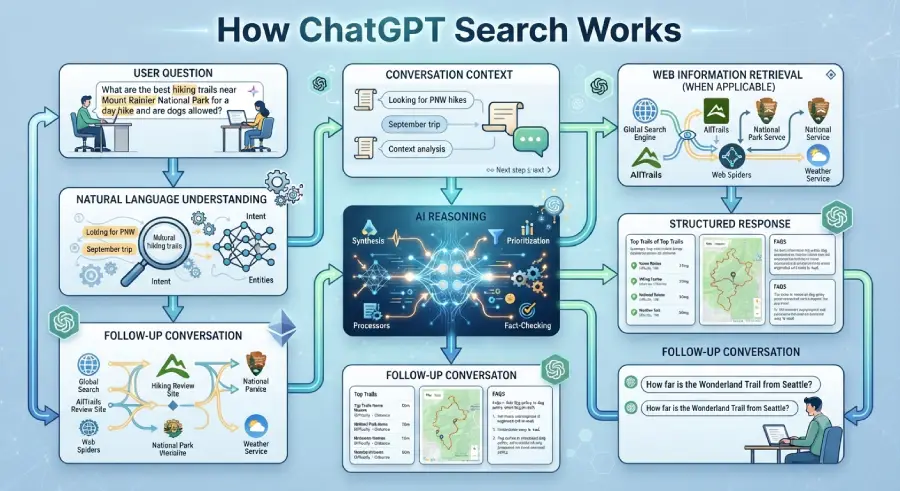
The experience feels simple, but several AI processes run underneath it: question → natural language understanding → conversation context → web retrieval when applicable → reasoning → response generation → follow-up conversation.
Step 1: Understanding Natural Language
The first step is interpreting what someone actually means sentence structure, intent, context, relationships between concepts, and prior conversation, not just keyword matching. Asked “I’m planning a two-week trip to Japan in October. I enjoy history, photography, and local food. Which cities should I visit?”, it reads destination, duration, interests, and the type of recommendation wanted not just “Japan” and “travel.”
Step 2: Maintaining Conversation Context
One of its biggest strengths is treating a conversation as continuous rather than a series of independent searches. “Recommend a gaming laptop” followed by “which one has better battery life?” gets understood without needing clarification a smoother, more efficient experience than starting fresh each time.
Step 3: Retrieving Relevant Information
Where appropriate, ChatGPT Search pulls in web information to help with questions that benefit from current or external data technology, business, sports, finance, travel, product comparisons, and recent developments among them then combines that retrieved information with reasoning to produce a coherent answer.
Step 4: Reasoning
Rather than copying content directly from a webpage, it analyzes what it found and organizes it into structure. Asked to “compare electric vehicles for families,” it might break the answer into safety, driving range, charging, interior space, technology, pricing, and recommendations a structure that helps someone actually decide.
Step 5: Generating the Response
The final answer might include summaries, recommendations, comparisons, step-by-step instructions, lists, tables, and explanations built to keep the conversation going rather than forcing a fresh search for every follow-up.
Key Features of ChatGPT Search
Conversational search: ask naturally without worrying about exact keywords.
Context awareness: remembers previous messages and supports meaningful follow-ups.
Writing assistance: outlines, drafts, grammar, summaries, and brainstorming.
Coding assistance: explaining concepts, debugging, generating examples, and technical documentation.
Research support: summarizing complex topics and comparing information clearly.
Productivity features: meeting prep, business planning, learning, email drafting, project planning, idea generation.
Multimodal capabilities: depending on available features, working with images and documents alongside text.
Why ChatGPT Search Matters
ChatGPT Search reflects a shift from simply finding information toward actually understanding it organizing knowledge into clear, conversational answers rather than asking people to compare a dozen webpages themselves. This trend is explored further in Why Users Are Switching from Google Search to AI Chatbots and How ChatGPT Is Influencing Consumer Search Decisions.
ChatGPT Search vs. Google AI Mode
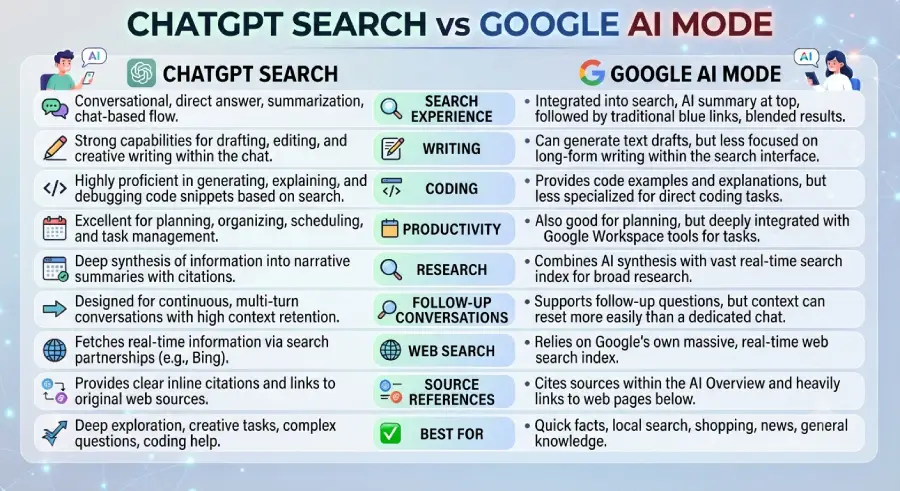
Both represent the next generation of AI-powered search, but with different priorities. Google AI Mode extends the traditional Google Search experience with AI-generated responses, while ChatGPT Search combines conversational AI with web search to create a broader interactive assistant for research, learning, writing, coding, and problem-solving.
| Feature | ChatGPT Search | Google AI Mode |
| Primary Purpose | AI assistant with web search | AI-enhanced Google Search |
| Search Style | Conversational | Conversational + traditional search |
| Context Memory | Maintains conversation context | Supports contextual follow-ups |
| Writing Assistance | Excellent | Good |
| Coding Support | Excellent | Good |
| Brainstorming | Excellent | Good |
| Research Support | Excellent | Excellent |
| Best For | Writing, coding, learning, productivity | General web search and information discovery |
ChatGPT Search fits well if you want to: brainstorm, write articles or emails, learn new concepts, generate or debug code, analyze documents, compare products, or hold a longer, connected conversation.
Google AI Mode fits well if you want to: explore current web information, find official sites, search local businesses, compare shopping options, or navigate Google’s ecosystem generally. Full explanation: Google AI Mode Explained. For a broader platform comparison, see Best AI Search Engines in 2026.
ChatGPT Search vs. Traditional Search
Traditional search requires browsing multiple webpages before landing on an answer. ChatGPT Search replaces that with organized, conversational responses.
| Traditional Search | ChatGPT Search |
| Keyword-based | Natural language |
| List of links | AI-generated answers |
| Manual comparison | Built-in comparisons |
| Independent searches | Follow-up conversations |
| Multiple webpages | Structured summaries |
| User synthesizes information | AI helps organize information |
Traditional search: search “best AI writing tools” → open 8–10 sites → compare features manually → reach a conclusion.
ChatGPT Search: ask for the best AI writing tools for bloggers under $30/month → it analyzes the request → provides a comparison table → explains pros and cons → answers follow-ups.
That conversational workflow saves real time while making the research itself more thorough. See AI Search vs Traditional Search for more on this shift generally.
Best Use Cases for ChatGPT Search
Students
Understanding complex subjects, summarizing study material, explaining math concepts, learning programming, preparing presentations, generating practice questions, and improving writing “explain quantum computing like I’m a beginner” is a typical example, turning technical jargon into something actually understandable.
Content Writers
Topic research, content outlines, blog writing, headline generation, meta descriptions, FAQs, and editing something like “generate ten blog ideas about AI search for beginners” is a common starting point.
SEO Professionals
Keyword ideas, topic clusters, content briefs, article structure, search intent research, and internal linking strategy a well-built AI Search content hub is itself a good example of a topic cluster supporting real topical authority.
Developers
Explaining code, debugging, learning new frameworks, API documentation, SQL queries, regular expressions, and code optimization “explain Python decorators with practical examples” is a common ask.
Researchers
Summarizing complex papers, comparing viewpoints, explaining technical terminology, generating research questions, and organizing information a useful starting point, with important findings still verified against original, authoritative sources.
Business Owners
Researching competitors, developing marketing ideas, drafting business plans, preparing presentations, creating customer FAQs, and analyzing market trends.
Everyday Users
Travel planning, product recommendations, meal ideas, learning new skills, personal finance education, home improvement, and general technology advice.
Benefits of ChatGPT Search
Natural conversation: Interacting with AI feels closer to talking with a knowledgeable person than running a search.
Faster research: Organized summaries cut down significantly on time spent opening multiple sites.
Better productivity: Search, writing, coding, brainstorming, and planning combined in one place.
Personalized responses: Answers shaped by conversation context and specific stated goals.
A genuine multi-purpose assistant: Writing, learning, coding, planning, and decision-making all within the same conversation.
Limitations of ChatGPT Search
AI can make mistakes: Generative AI may occasionally produce inaccurate, outdated, or incomplete information verify anything critical against trusted, authoritative sources.
Not every task needs AI: Finding an official government site, checking a company homepage, accessing a banking portal, or looking up a local business is often faster with a traditional search engine.
Context shapes responses: Because it remembers conversation history, a major topic shift within the same chat can muddy results starting a new conversation often gives cleaner answers.
Feature availability varies: Web search, document analysis, and multimodal capabilities can differ depending on the platform version and available features.
What This Means for Publishers
Helpful Content Wins
Content that genuinely answers a real question outperforms content built mainly to target a keyword.
Topic Clusters Build Real Authority
Interconnected articles around one subject demonstrate expertise far more convincingly than isolated posts. A hub linking What Is AI Search?, How AI Search Works, Best AI Search Engines in 2026, and platform-specific guides like this one shows readers and search engines the depth of coverage behind it.
Lead With Direct Answers
Answering important questions early and clearly “What is ChatGPT Search?” followed immediately by a concise definition improves readability and helps readers get oriented fast.
Getting Better Results From ChatGPT Search
- Ask clear, specific questions instead of vague prompts
- Provide relevant context up front when it matters
- Break complex tasks into smaller, manageable steps
- Verify important information against authoritative sources
- Use follow-up questions to refine and narrow the answer
- Combine it with traditional search when the task calls for it
- Stay aware of AI’s limitations, especially for high-stakes decisions
Frequently Asked Questions
What is ChatGPT Search?
ChatGPT Search is an AI-powered conversational search experience combining natural language understanding with web information retrieval to give direct, context-aware answers helping people understand information through structured responses and supporting natural follow-up questions.
How does ChatGPT Search work?
It understands natural language queries, interprets intent, retrieves relevant web information when appropriate, uses reasoning to organize that information, generates conversational responses, and maintains context for follow-up questions.
Is ChatGPT Search free?
It’s available through ChatGPT, though features and usage limits can vary depending on your plan and the platform’s current offerings check ChatGPT directly for the most current availability.
Can ChatGPT Search replace Google Search entirely?
Not entirely. It’s excellent for learning, research, writing, brainstorming, coding, and summarizing but traditional search remains valuable for official sites, local business searches, shopping, maps, and breaking news. For most people, using both together works best.
Is ChatGPT Search accurate?
It aims to be helpful and relevant, but like any AI system it can occasionally produce inaccurate or incomplete responses. Always verify anything important especially medical, legal, financial, or safety-related information against authoritative sources.
Does ChatGPT Search support follow-up questions?
Yes, maintaining conversational context is one of its biggest strengths, letting people ask a follow-up like “which one has the best battery life?” without repeating the full original question.
Is ChatGPT Search good for students?
Yes, commonly used for explaining difficult concepts, summarizing study material, preparing presentations, learning programming, practicing interview questions, and improving writing, best used alongside trusted educational resources.
Is ChatGPT Search useful for SEO work?
Yes, used for keyword brainstorming, content planning, topic clusters, search intent analysis, content outlines, meta descriptions, and internal linking ideas, though human expertise and editorial review remain essential for quality, trustworthy content.
How is ChatGPT Search different from Google AI Mode?
ChatGPT Search focuses on being a broad AI assistant with conversational search built in; Google AI Mode extends Google’s existing search experience with AI-generated responses. ChatGPT Search tends to be stronger for writing, coding, and brainstorming; AI Mode tends to be stronger for general web search, product discovery, and local information.
Can businesses benefit from ChatGPT Search?
Yes, commonly used for marketing ideas, competitor research, customer support content, email and report drafting, product brainstorming, trend analysis, and general team productivity.
Key Takeaways
- ChatGPT Search combines conversational AI with web search capabilities
- It understands natural language and genuinely supports follow-up conversations
- It’s well suited for research, writing, coding, learning, and productivity
- Traditional search engines remain important for navigation, official sites, local search, and breaking news
- High-quality, trustworthy content remains essential in an AI-powered search landscape
- Publishers should focus on topical authority, genuinely helpful content, and strong internal linking
- Using ChatGPT Search alongside traditional search tends to produce the most complete experience
Conclusion
ChatGPT Search reflects a real shift in how people find and interact with information online. Instead of relying purely on keyword searches and browsing multiple webpages, people can ask detailed questions in natural language and get structured, conversational answers that save time and simplify complex topics.
Its ability to hold context, support genuine follow-up conversation, and help with writing, coding, research, and brainstorming makes it more than a search tool it functions as a genuinely versatile assistant for both personal and professional use.
At the same time, traditional search engines still play an essential role for official sources, current news, local businesses, and specific websites. The more accurate framing isn’t replacement it’s a complementary way of finding and understanding information.
For publishers, the rise of conversational AI reinforces the same theme across this whole platform series: original, helpful, well-organized content backed by genuine topic clusters and internal linking is what holds up. See PostDune’s guides on Google AI Mode Explained, Google Gemini Explained, Microsoft Copilot Explained, Perplexity AI Explained, and Claude AI Explained for the rest of the comparison series.