
AI is reshaping how people search, create, solve problems, and get through everyday tasks. Instead of relying only on a traditional search engine, millions of people now turn to AI assistants that understand natural language, answer complex questions, summarize information, write code, and help with creative work.
Google Gemini Google’s own multimodal AI assistant is one of the more influential platforms in that shift. It can understand and generate text, analyze images, help with code, support research, and assist across a wide range of personal and professional tasks. Where a traditional search engine mostly hands you a list of pages, Gemini aims to give you direct, conversational assistance instead.
Instead of separately researching market data, presentation ideas, competitor analysis, and content outlines, someone could ask Gemini to “create a six-month digital marketing strategy for an e-commerce startup, identify current trends, suggest content ideas, outline a presentation, and recommend measurable goals” and get it organized into one structured response.
If you’re new to this space, start with PostDune’s Complete Guide to AI Search in 2026 and What Is AI Search?.
This guide covers what Google Gemini actually is, how it works, its key features, practical use cases, real limitations, and how it compares to ChatGPT, Microsoft Copilot, Perplexity AI, Google AI Mode, and traditional search.
What Is Google Gemini?
Google Gemini is Google’s AI-powered assistant, built on generative AI to understand natural language, process multiple types of information, and help with a wide range of tasks. Rather than mainly returning webpages, it’s focused on understanding what someone actually wants and generating a genuinely useful response solving a problem, drafting content, explaining a concept, or moving a project forward.
Depending on the task, people use Gemini to answer questions, explain complex topics, generate written content, brainstorm, write and explain code, summarize long documents, analyze images, assist with planning, support research, and continue a conversation through natural follow-ups. Its multimodal ability to work across different kinds of input is what gives it more flexibility than a text-only system.
Why Google Gemini Works Differently
A traditional search engine helps you discover information. Gemini helps you turn that information into something usable. Instead of separately searching “best project management software,” “project planning guide,” and “agile workflow examples,” someone can ask Gemini to compare leading platforms for a growing software company, recommend an option based on collaboration and scalability, summarize the differences, and draft an implementation plan all in one structured response instead of a stack of links to sort through.
Why Google Gemini Has Grown So Fast
Genuinely Multimodal
One of Gemini’s biggest strengths is working across multiple forms of information at once text, images, code, and documents, depending on the experience which makes interactions feel more natural and flexible than a text-only assistant.
Natural Language, No Keyword Gymnastics
Instead of typing “python dictionary tutorial,” someone can ask Gemini to “explain Python dictionaries with beginner-friendly examples and a short practice exercise” and get a response tailored to that specific framing.
Real Writing Assistance
Gemini helps generate blog outlines, reports, emails, product descriptions, marketing copy, study notes, presentation content, and business proposals less a replacement for human creativity and more a way to get past writer’s block and speed up drafting.
Research Support
Gemini can organize information into clear summaries and highlight key concepts, which makes it a reasonable starting point for researchers, students, and professionals before moving on to authoritative sources for anything that actually matters.
Coding Assistance
Developers use Gemini to explain concepts, generate sample code, debug errors, learn new frameworks, and understand APIs with the usual caveat that AI-generated code needs review and testing before deployment.
Context That Actually Carries Over
Gemini tracks conversational context, so a follow-up like “turn it into a presentation outline” after “summarize this report” gets understood as a continuation, not a fresh, unrelated request.
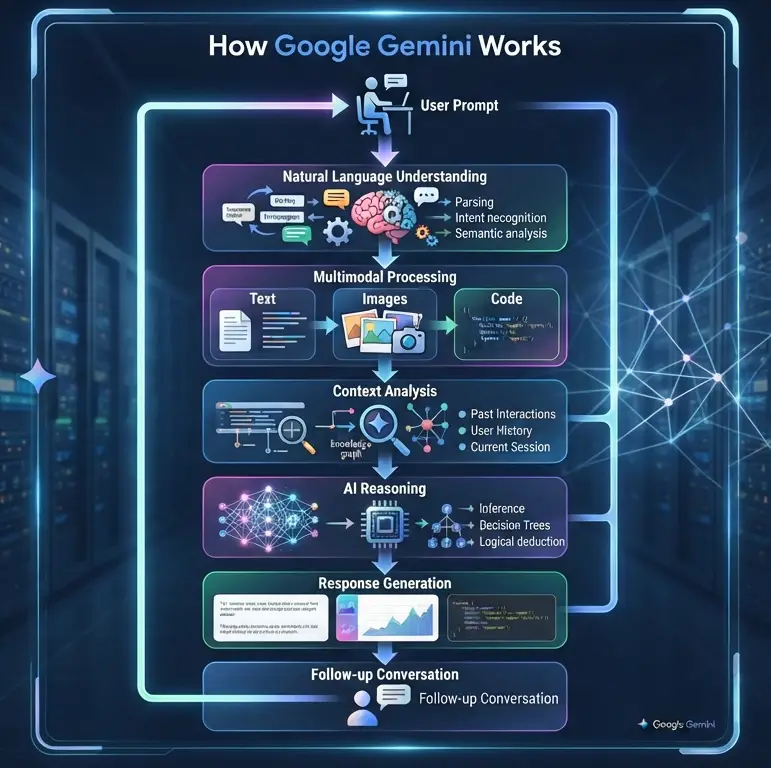
How Google Gemini Works
Gemini feels simple to use, but several AI processes run underneath that simplicity: prompt → natural language understanding → context analysis → multimodal processing → reasoning → response generation → follow-up conversation.
Step 1: Natural Language Understanding
Gemini starts by evaluating intent, context, sentence structure, prior conversation, and desired outcome not just matching keywords. Asked to “create a social media strategy for a local restaurant targeting young professionals,” it interprets the broader marketing objective rather than getting stuck defining “social media.”
Step 2: Context Analysis
Ongoing conversations get tracked so follow-ups feel natural. “Create a product launch plan” followed by “make it suitable for a small business” reads as a modification of the original request, not a new topic.
Step 3: Multimodal Processing
Depending on the interface and available features, Gemini can work with written text, images, code snippets, documents, and mixed inputs particularly useful for anyone working across multiple content formats at once.
Step 4: Reasoning
Gemini organizes rather than just retrieves. Asked to “compare electric vehicles for families,” it might structure the answer around safety, driving range, charging options, interior space, pricing, and long-term ownership a breakdown that actually helps someone decide.
Step 5: Response Generation
The final response might take the form of a summary, step-by-step guide, table, brainstorm, report, marketing plan, learning material, code example, or action plan built to help someone move past just finding information and into actually getting something done.
Key Features of Google Gemini
Conversational AI: ask naturally, without worrying about exact keyword phrasing.
Multimodal understanding: works across different forms of information for more flexible interactions.
Writing assistance: articles, emails, reports, marketing copy, product descriptions, presentation outlines, social content.
Coding support: explanations, code examples, debugging help, and guidance across many languages.
Research assistance: organizing complex information into understandable summaries.
Brainstorming: ideas for businesses, blog topics, campaigns, product launches, and creative writing.
Learning support: understanding difficult concepts, study notes, revision guides, and practice problems.
Productivity: organizing tasks, drafting documents, and planning projects.
Why Google Gemini Matters
Gemini reflects a broader shift in AI assistants moving past pure search into conversational AI, multimodal capability, and productivity support all at once. For more on how this is reshaping discovery generally, see How AI Is Changing User Search Behavior in 2026. For platform comparisons, see PostDune’s guides on ChatGPT Search, Microsoft Copilot, Perplexity AI, and Google AI Mode.
Google Gemini vs. ChatGPT
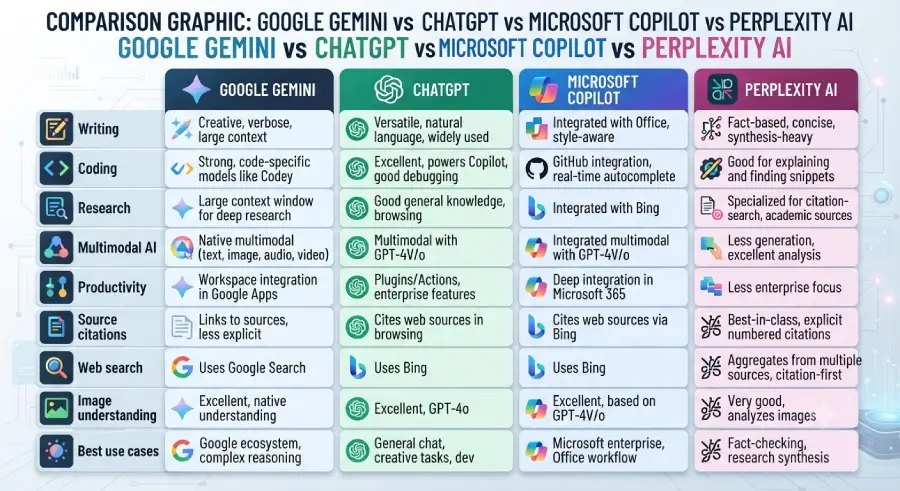
Both are among the most widely used AI assistants, and both handle questions, content creation, coding, summarization, and research well. Gemini is closely tied to Google’s ecosystem and leans into multimodal capability and productivity; ChatGPT is known for strong conversational range, versatile writing, coding support, and broad workflow flexibility.
| Feature | Google Gemini | ChatGPT |
| Primary Focus | AI assistant with multimodal capabilities | Conversational AI and productivity |
| Natural Conversations | Excellent | Excellent |
| Writing Assistance | Excellent | Excellent |
| Coding Support | Excellent | Excellent |
| Image Understanding | Excellent | Excellent |
| Research | Very Good | Excellent |
| Best For | Google ecosystem users and multimodal tasks | Writing, coding, research, learning, and creative work |
Gemini fits well if you regularly: analyze images alongside text, brainstorm, learn new concepts, draft documents, generate creative content, solve coding problems, or already live inside Google’s ecosystem.
ChatGPT fits well if you regularly: do long-form writing, programming, content planning, research, or business strategy work. Full comparison: ChatGPT Search Explained.
Google Gemini vs. Microsoft Copilot
Both focus on productivity, but for different workflows. Copilot is deeply oriented toward workplace tasks and Microsoft’s own applications; Gemini offers a broader multimodal experience suited to both personal and professional use.
| Feature | Google Gemini | Microsoft Copilot |
| Conversational AI | Excellent | Excellent |
| Multimodal AI | Excellent | Very Good |
| Writing | Excellent | Excellent |
| Coding | Excellent | Excellent |
| Research | Excellent | Very Good |
| Office Workflows | Good | Excellent |
| Best For | General AI assistance and creativity | Workplace productivity and Microsoft ecosystem |
Choose Gemini for multimodal work, learning support, creative writing, and flexible general-purpose AI use. Choose Copilot if your work centers on business documents, spreadsheets, presentations, and email inside Microsoft’s tools. Full comparison: Microsoft Copilot Explained.
Google Gemini vs. Perplexity AI
Both support conversational interaction, but they’re built for different priorities Perplexity is focused on research and citation-backed answers, while Gemini leans toward multimodal capability, creativity, and general productivity.
| Feature | Google Gemini | Perplexity AI |
| AI Conversations | Excellent | Excellent |
| Research | Excellent | Excellent |
| Source Citations | Limited, depending on experience | Strong emphasis |
| Writing | Excellent | Good |
| Coding | Excellent | Good |
| Multimodal AI | Excellent | Limited |
| Best For | Everyday AI assistance | Research and fact discovery |
Use Perplexity when the priority is academic research, source verification, or fact-checking across multiple references. Use Gemini for creative work, coding, learning, brainstorming, or multimodal tasks. Full comparison: Perplexity AI Explained.
Google Gemini vs. Google AI Mode
These two get confused often, but they serve different purposes. Gemini is an AI assistant built for conversation, creativity, productivity, and task completion. Google AI Mode enhances Google’s actual search experience delivering AI-generated search responses while still helping users discover information across the web.
| Feature | Google Gemini | Google AI Mode |
| Primary Purpose | AI assistant | AI-enhanced search |
| Writing Assistance | Excellent | Limited |
| Coding | Excellent | Limited |
| Research | Excellent | Excellent |
| Search Integration | Good | Excellent |
| Local Search | Limited | Excellent |
| Best For | AI productivity | AI-powered web search |
Choose Gemini to create content, brainstorm, learn, code, or summarize. Choose AI Mode when the goal is genuinely searching the web, discovering sites, finding businesses, or comparing products. Full explanation: Google AI Mode Explained.
Google Gemini vs. Traditional Search
A traditional search engine helps you find webpages. Gemini helps you understand information, generate content, and actually finish a task.
| Traditional Search | Google Gemini |
| Keyword searches | Natural language conversations |
| List of links | AI-generated responses |
| Manual research | Guided assistance |
| User organizes information | AI structures information |
| Independent searches | Context-aware conversations |
| Multiple browser tabs | Unified conversational workflow |
Traditional search: search “how to create a business plan” → open multiple sites → read → take notes → write the plan manually → build a presentation.
Gemini: ask for a complete business plan with market analysis, pricing strategy, competitor overview, marketing plan, financial assumptions, and a presentation outline → Gemini generates structured content → suggests improvements → answers follow-ups.
That workflow lets people move from research to execution noticeably faster. See AI Search vs Traditional Search for more on this shift generally.
Best Use Cases for Google Gemini
Students
Understanding difficult subjects, creating study guides, summarizing notes, practicing problem-solving, preparing presentations, and brainstorming project ideas used responsibly alongside textbooks, instructors, and original research, not as a replacement for them.
Developers
Explaining code, generating snippets, debugging, learning new languages, exploring APIs, and improving workflows with AI-generated code always reviewed and tested before production use.
Business Professionals
Drafting reports, brainstorming, creating proposals, planning marketing campaigns, analyzing scenarios, and organizing presentations.
Content Creators
Generating article ideas, building content outlines, drafting posts, rewriting copy, planning social campaigns, and developing content calendars useful during brainstorming and outlining, with human expertise still driving originality, fact-checking, and editorial quality.
Digital Marketers
Campaign ideas, ad copy, SEO content planning, keyword brainstorming, email campaigns, and audience messaging analysis.
Researchers
Exploring unfamiliar topics, summarizing information, organizing notes, and generating research outlines with primary and authoritative sources still essential for academic or professional work.
Benefits of Google Gemini
Natural conversation: Everyday language instead of keyword-based searching.
Real multimodal capability: Flexibility across text, images, and other input types.
Improved productivity: Less repetitive work drafting documents or planning projects.
Creative assistance. Help getting past writer’s block on posts, campaigns, or presentations.
Learning support: Structured explanations that make complex topics easier to approach.
Limitations of Google Gemini
AI can produce errors: Responses may occasionally be inaccurate, outdated, or incomplete verify anything important before acting on it, especially for legal, medical, financial, or business decisions.
Human judgment still matters: Review AI-generated content for accuracy, clarity, tone, and context before publishing or sharing it.
Feature availability varies: Capabilities can depend on product, device, account type, region, or subscription check what’s actually available in your environment.
Not a substitute for expertise: Gemini is a capable assistant, not a replacement for professional judgment or domain knowledge.
What This Means for Publishers
Prioritize Helpful, Original Content
AI systems increasingly favor content that demonstrates real expertise and practical value over generic summaries in-depth guides, tutorials, case studies, and experience-driven writing tend to hold up better.
Build Real Topic Clusters
A well-connected AI Search hub covering What Is AI Search?, How AI Search Works, Best AI Search Engines in 2026, and platform guides like this one improves topical authority and keeps readers engaged across related content.
Answer High-Intent Questions Directly
Direct, concise answers to questions like “What is Google Gemini?”, “Is Google Gemini free?”, and “Google Gemini vs ChatGPT” improve the reader experience and support visibility in AI-powered search.
Frequently Asked Questions
What is Google Gemini?
Google Gemini is Google’s AI-powered assistant, using generative AI to help answer questions, create content, write code, analyze information, brainstorm, and complete productivity tasks through natural conversation. It also supports multimodal interaction, working with different input types depending on the experience.
How does Google Gemini work?
It interprets natural language prompts, analyzes intent and conversational context, processes different types of information, applies reasoning to organize a response, and supports follow-up questions to maintain context.
Is Google Gemini free?
Google offers free access to certain Gemini experiences, with some advanced features requiring a paid subscription or specific Google services. Availability changes over time, so check Google’s current plans for specifics.
Is Google Gemini better than ChatGPT?
There’s no single best assistant for everyone. Gemini tends to stand out for multimodal tasks, creative brainstorming, learning support, and Google ecosystem integration; ChatGPT tends to stand out for long-form writing, conversational range, coding, and research. Many people use both, depending on the task.
Can Google Gemini search the web?
Depending on the specific product and feature, Gemini can incorporate web information into responses for more current answers capabilities vary across different Gemini experiences.
Can Google Gemini write code?
Yes, generating examples, explaining concepts, debugging, suggesting improvements, and helping with new languages or APIs. As always, review and test AI-generated code before deployment.
Is Google Gemini good for students?
Yes, as a learning aid explaining concepts, summarizing materials, preparing revision notes, brainstorming projects, and practicing problem-solving. Students should still verify information independently and follow their institution’s academic integrity guidelines.
Is Google Gemini accurate?
Generally useful and well-structured, but like any AI system it can occasionally produce inaccurate, outdated, or incomplete information. Verify anything involving legal, medical, financial, or academic decisions against authoritative sources.
What makes Google Gemini different from traditional search engines?
Traditional search mostly helps you find webpages. Gemini helps you understand information, generate content, and organize ideas directly, while supporting natural follow-up conversation.
Is Google Gemini useful for businesses?
Yes, commonly used for content creation, marketing planning, research, proposals, brainstorming, data organization, and general productivity, reducing repetitive work while supporting decision-making.
Key Takeaways
- Google Gemini is Google’s AI assistant for conversation, productivity, learning, and creativity
- It combines natural language understanding with genuine multimodal capability
- It supports writing, research, brainstorming, coding, summarization, and organization
- AI-generated content should always be reviewed and verified before important use
- Businesses, students, developers, marketers, and creators can all get real value from it
- Original, well-structured content remains essential for visibility in both traditional and AI-powered search
Conclusion
Google Gemini combines conversational AI with genuine multimodal capability to help people work more efficiently, learn more effectively, and solve problems more creatively. Whether the task is writing, analyzing information, building a presentation, exploring a new topic, or writing software, it offers a flexible environment for getting things done.
Where traditional search mostly points you toward webpages, Gemini is built around understanding intent and delivering something actionable and its ability to hold context across a conversation makes it a genuinely useful companion for students, professionals, businesses, developers, and creators.
That said, it’s still a tool that enhances human capability rather than replacing it. Reviewing its output, verifying anything important, and applying real judgment remain essential parts of using it well.
For publishers, tools like Gemini reinforce a familiar pattern: comprehensive, trustworthy, genuinely helpful content backed by real topic clusters and internal linking continues to matter for visibility across both traditional and AI-powered search. See PostDune’s guides on ChatGPT Search Explained, Microsoft Copilot Explained, Perplexity AI Explained, and Claude AI Explained for the rest of the platform comparison series.