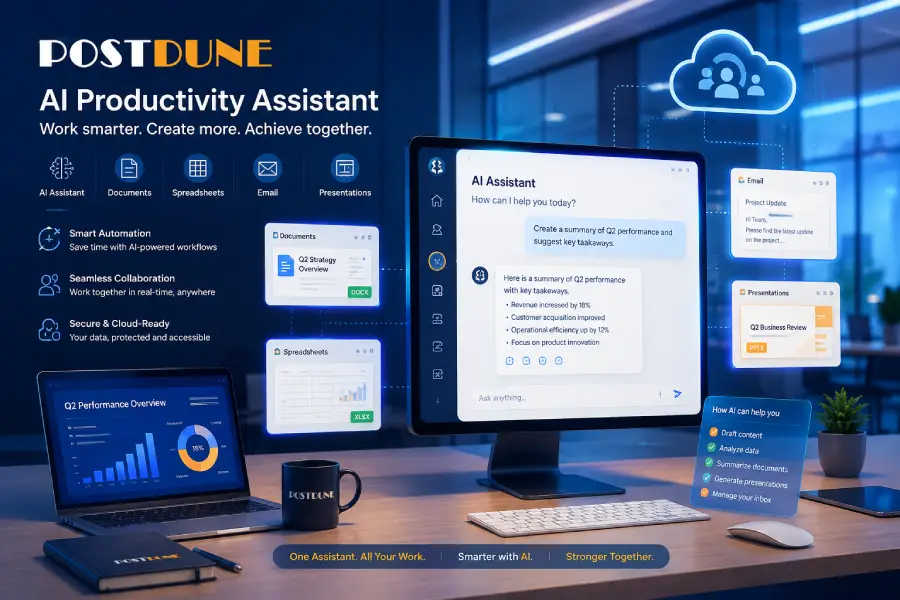
AI has moved well past chatbots and search boxes. It’s becoming a genuine part of everyday productivity writing documents, summarizing meetings, analyzing spreadsheets, generating presentations, researching topics, writing code, and answering complex questions.
Microsoft Copilot has become one of the more widely adopted tools in that shift, for individuals, students, businesses, and enterprises alike. By combining conversational AI, web search, and integration across Microsoft’s own applications, it’s built to help people finish tasks without constantly switching between separate tools.
Picture preparing a business presentation: instead of separately searching the web, gathering data, building slides, drafting emails, and digging through spreadsheets, someone could ask Copilot to create a presentation outlining the latest AI search trends, summarize recent developments, suggest supporting visuals, and draft an email introducing it to their team all handled as one connected workflow rather than a search tool bolted onto everything else.
If you’re new to AI-powered search, start with PostDune’s Complete Guide to AI Search in 2026 and What Is AI Search?.
This guide covers what Microsoft Copilot actually is, how it works, its major features, real limitations, practical use cases, and how it compares to ChatGPT Search, Perplexity AI, Google AI Mode, and traditional search.
What Is Microsoft Copilot?
Microsoft Copilot is an AI-powered assistant combining conversational AI, web search, and productivity features to help people complete tasks across Microsoft’s ecosystem and beyond. Instead of just answering questions, it’s built to help with actual work generating written content, summarizing documents, analyzing spreadsheets, drafting emails, creating presentations, researching, writing and explaining code, brainstorming, and automating repetitive tasks.
That broader productivity focus is what sets Copilot apart from a traditional search engine it’s positioned less as a search tool and more as a genuine productivity assistant for both personal and professional use.
Why Microsoft Copilot Works Differently
A traditional search engine helps you find information. Copilot helps you actually use it. Instead of separately searching “best CRM software,” “CRM comparison,” “CRM pricing,” and “CRM implementation guide,” someone can ask Copilot to compare leading CRM platforms for a small business, recommend an option based on budget and scalability, summarize the key differences, and draft a presentation outline for management organized into something usable instead of a stack of links.
Why Microsoft Copilot Has Grown So Popular
Built Around Actually Getting Things Done
Where a lot of AI platforms lean heavily into open-ended conversation, Copilot is built around finishing practical tasks writing reports, drafting proposals, building presentations, summarizing long documents, organizing meeting notes, analyzing spreadsheets, and managing email. That practical focus is a big part of why it’s landed so well in workplace settings specifically.
Natural Language Instead of Keyword Guessing
Instead of searching “sales report excel formulas,” someone can ask Copilot to “analyze this sales spreadsheet, identify the best-performing products, and summarize the key trends” and get a response built around that specific, complete request.
Real Writing Support
Copilot helps with emails, reports, blog drafts, business proposals, marketing copy, presentations, meeting summaries, and project documentation not a finished product, but a solid first draft that’s faster to refine than starting from a blank page.
Better Workplace Collaboration
A lot of professional time gets lost switching between email, documents, presentations, spreadsheets, and meetings. Copilot is built to streamline that by assisting across multiple tasks at once, cutting down on repetitive work.
Context That Carries Through a Conversation
Copilot tracks context, so “turn it into a presentation” after “summarize this report” gets read as a follow-up, not a request to restate the whole document again.
How Microsoft Copilot Works
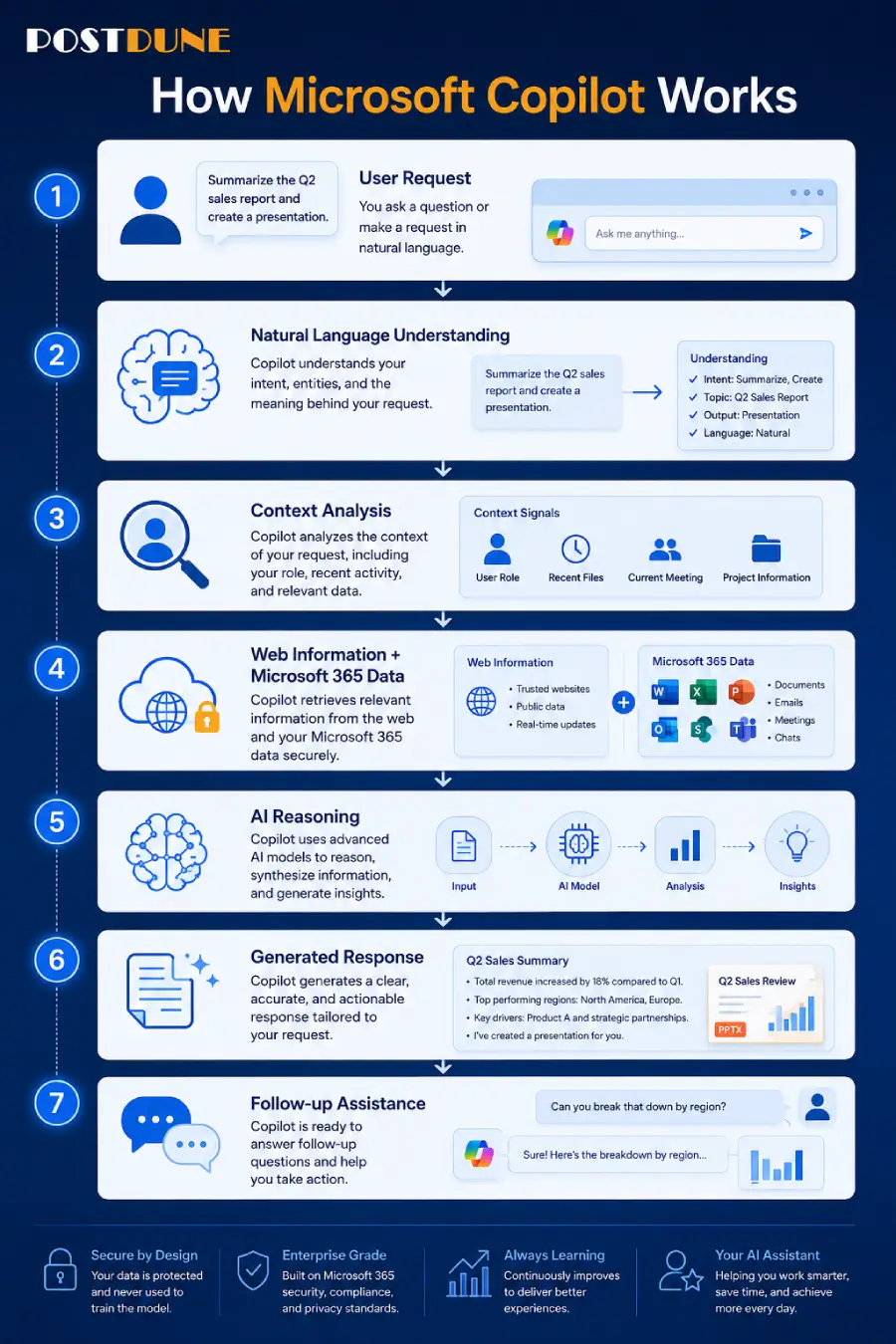
Copilot feels simple to use, but several processes run behind that simplicity: request → natural language understanding → context analysis → information retrieval → reasoning → generated response → follow-up assistance.
Step 1: Understanding Natural Language
Copilot analyzes intent, sentence structure, context, prior conversation, and desired outcome not just keywords. Asked to “create a six-month marketing strategy with estimated priorities” for a new online clothing store, it interprets the broader business planning request rather than getting stuck defining “marketing strategy.”
Step 2: Context Analysis
Unlike a traditional search engine, Copilot remembers the ongoing conversation. “Write an executive summary” followed by “make it shorter” is understood as a request to shorten the summary Copilot just generated not a new, unrelated task.
Step 3: Information Retrieval
Where appropriate, Copilot can pull in web information to help with current topics across technology, business, finance, education, travel, sports, and product comparisons useful when a request genuinely calls for up-to-date information.
Step 4: Reasoning
Rather than just copying from different sources, Copilot organizes information into something usable. Asked to “compare cloud storage services,” it might structure the answer around pricing, storage, security, collaboration, business features, and best use cases a breakdown that actually supports a decision.
Step 5: Response Generation
The final output might be a summary, table, list, recommendation, report, email, presentation, action plan, or brainstorm built around moving someone from searching to actually doing.
Key Features of Microsoft Copilot
Conversational AI: ask naturally without worrying about exact keywords.
Writing assistance: emails, reports, blog drafts, articles, marketing content, proposals, meeting notes.
Document summarization: turning lengthy documents into key points quickly.
Spreadsheet analysis: identifying trends and explaining complex data.
Presentation assistance: outlines and content ideas for meetings, classrooms, or pitches.
Coding assistance: explaining code, debugging, generating snippets, and understanding APIs.
Brainstorming: ideas for campaigns, business names, launches, and content.
Productivity automation: reducing repetitive work across common office tasks.
Why Microsoft Copilot Matters
Copilot reflects a real shift in AI from helping people find information toward helping them complete meaningful work. That trend is explored further in How AI Is Changing User Search Behavior in 2026. For platform comparisons, see PostDune’s guides on ChatGPT Search, Perplexity AI, and Google AI Mode.
Microsoft Copilot vs. ChatGPT Search
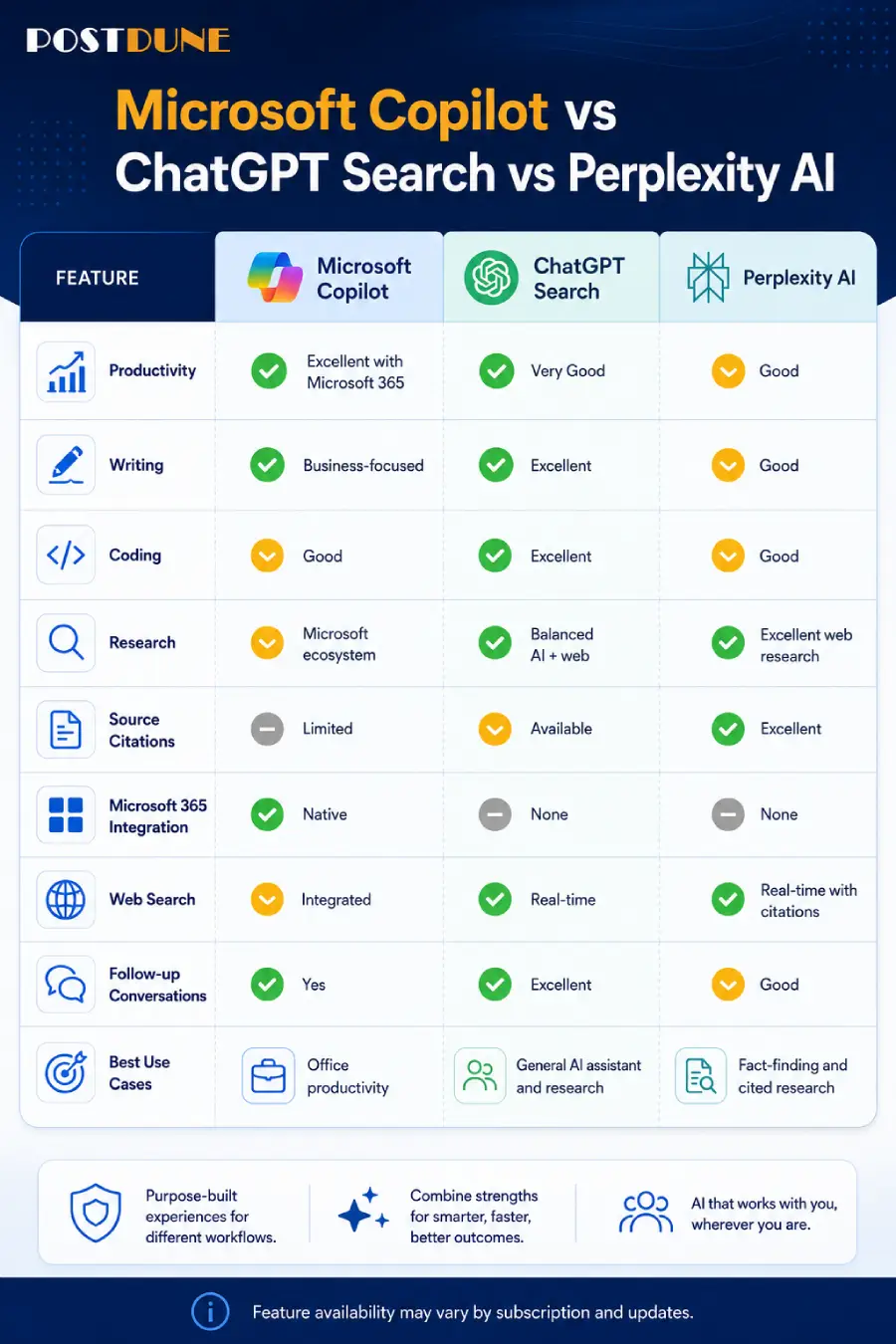
Both are highly capable answering questions, generating content, assisting with code, and helping complete complex tasks. Copilot is deeply woven into the Microsoft ecosystem and leans hard into workplace productivity; ChatGPT Search combines conversational AI with web search and covers a broader range of creative, technical, and research work.
| Feature | Microsoft Copilot | ChatGPT Search |
| Primary Focus | Productivity and Microsoft ecosystem | AI assistant with conversational web search |
| Web Search | Yes | Yes |
| Writing Assistance | Excellent | Excellent |
| Coding Support | Excellent | Excellent |
| Document Summaries | Excellent | Excellent |
| Spreadsheet Assistance | Excellent | Good to Excellent |
| Research | Very Good | Excellent |
| Best For | Microsoft 365 users and workplace productivity | Writing, research, coding, learning, and general AI assistance |
Copilot fits well if you regularly work with: documents, spreadsheets, presentations, emails, business reports, or team collaboration a business professional prepping a quarterly report can ask it to summarize data, draft executive insights, and build a presentation outline in one connected flow.
ChatGPT Search fits well if you need: research assistance, long-form writing, coding help, learning support, or broad creative brainstorming beyond office productivity. Full comparison: ChatGPT Search Explained.
Microsoft Copilot vs. Perplexity AI
Both use conversational AI, but they solve different problems Perplexity is built primarily for research and source-backed answers, while Copilot is built to help people finish work efficiently.
| Feature | Microsoft Copilot | Perplexity AI |
| Primary Purpose | Productivity | Research |
| Source Citations | Available in many web-based responses | Strong emphasis |
| Writing Assistance | Excellent | Good |
| Coding Support | Excellent | Good |
| Business Productivity | Excellent | Good |
| Research Workflow | Very Good | Excellent |
| Microsoft Integration | Excellent | No |
| Best For | Workplace productivity | Research and knowledge discovery |
Choose Perplexity for academic research, fact verification, or exploring multiple cited sources. Choose Copilot for workplace productivity, document creation, presentations, email management, and team collaboration. Full comparison: Perplexity AI Explained.
Microsoft Copilot vs. Google AI Mode
Both use AI to improve the search experience, but from different angles. Google AI Mode enhances Google’s own search experience directly, while Copilot extends AI into productivity and task completion more broadly.
| Feature | Microsoft Copilot | Google AI Mode |
| AI Conversations | Excellent | Excellent |
| Productivity | Excellent | Good |
| Research | Very Good | Very Good |
| Search Integration | Good | Excellent |
| Shopping Assistance | Good | Excellent |
| Local Search | Limited | Excellent |
| Office Productivity | Excellent | Limited |
| Best For | Productivity and business tasks | Everyday search and web discovery |
Choose Copilot to create documents, summarize reports, analyze spreadsheets, draft emails, or prepare presentations. Choose AI Mode to discover websites, find nearby businesses, shop online, or navigate general web search. Full explanation: Google AI Mode Explained.
Microsoft Copilot vs. Traditional Search
Traditional search helps you locate information across the web. Copilot helps you turn that information into actual, finished work.
| Traditional Search | Microsoft Copilot |
| Keyword-based search | Natural language conversations |
| List of webpages | AI-generated responses |
| Manual research | Guided assistance |
| User creates documents | AI helps generate documents |
| Multiple browser tabs | Integrated workflow |
| Independent searches | Context-aware conversations |
Traditional search: search “how to create a marketing strategy” → open several blogs → read → take notes → write the strategy manually → build a presentation.
Copilot: ask for a six-month marketing strategy for an eco-friendly startup, with goals, channels, budget, KPIs, and a presentation outline → Copilot researches and structures it → suggests improvements → answers follow-ups.
That workflow cuts a lot of the repetitive work while still leaving room to refine the output. See AI Search vs Traditional Search for more on this broader shift.
Best Use Cases for Microsoft Copilot
Business Professionals
Drafting reports, summarizing meetings, creating proposals, preparing executive presentations, analyzing business data, and generally improving day-to-day productivity.
Students
Explaining difficult topics, summarizing notes, preparing study guides, organizing research, building presentation outlines, and improving writing complementing classroom learning rather than replacing independent study.
Developers
Explaining code, generating examples, debugging, learning new languages, and understanding APIs with AI-generated code always reviewed and tested before production use.
Content Creators
Brainstorming article ideas, drafting outlines, generating social captions, summarizing research, and rewriting content useful for brainstorming specifically, with human expertise still driving originality and quality.
Digital Marketers
Campaign planning, ad copy, email sequences, competitor analysis, content calendars, and client reporting.
Researchers
Organizing information, summarizing lengthy documents, exploring new topics, and generating structured overviews with primary sources still essential for specialized or academic work.
Benefits of Microsoft Copilot
Improved productivity: Less repetitive work across writing, summarizing, organizing, and planning.
Real time savings: Fewer app switches to get a workflow done.
Natural conversation: Everyday language instead of memorized commands or search syntax.
Faster content creation: A structured first draft to refine, rather than starting from a blank page.
Workflow assistance: A collaborative presence across planning, organizing, and executing tasks.
Limitations of Microsoft Copilot
AI can make mistakes: Responses may occasionally contain errors, omissions, or outdated information verify anything important before relying on it for business, legal, financial, or medical decisions.
Human review still matters: Documents, reports, presentations, and emails generated by AI should be reviewed for accuracy, clarity, and tone before sharing.
Feature availability varies: Some capabilities depend on the application, account type, region, or subscription check what’s actually available in your environment.
A productivity tool, not a full replacement: Copilot is built to enhance human productivity, not replace critical thinking, creativity, or professional expertise.
What This Means for Publishers
Prioritize Original, Helpful Content
AI systems increasingly favor content that demonstrates real expertise and usefulness over generic material practical guides, case studies, tutorials, and in-depth resources tend to hold up better across both traditional and AI-powered search.
Build Genuine Topic Clusters
A well-connected AI Search hub What Is AI Search?, How AI Search Works, Best AI Search Engines in 2026, and platform guides like this one strengthens topical authority and gives readers an easy path to related content.
Answer High-Intent Questions Directly
Direct answers to questions like “What is Microsoft Copilot?”, “Is Microsoft Copilot free?”, and “Can Microsoft Copilot summarize documents?” improve both user experience and visibility in AI-powered search.
Frequently Asked Questions
What is Microsoft Copilot?
Microsoft Copilot is an AI-powered assistant that helps people research information, generate content, summarize documents, analyze data, write code, and improve productivity combining conversational AI with web information retrieval and, in many Microsoft products, direct integration with productivity applications.
How does Microsoft Copilot work?
It interprets natural language questions, analyzes intent and conversational context, retrieves relevant information when appropriate, uses AI reasoning to generate structured responses, and supports follow-up questions within the same conversation.
Is Microsoft Copilot free?
Microsoft offers free access to certain Copilot experiences, with additional features tied to specific products or paid subscriptions. Availability depends on the service you’re using, so check Microsoft’s current documentation for specifics.
Is Microsoft Copilot better than ChatGPT Search?
Neither is universally better they serve different needs. Copilot tends to stand out for productivity, document creation, business workflows, and Microsoft ecosystem integration; ChatGPT Search tends to stand out for research, long-form writing, brainstorming, and broad conversational problem-solving. Many people use both, depending on the task.
Can Microsoft Copilot browse the web?
Yes, depending on the experience and feature set it can use web information to answer questions, summarize current topics, and support research, though exact capabilities vary across products.
Can Microsoft Copilot summarize documents?
Yes, this is one of its most popular capabilities, turning lengthy documents, reports, meeting notes, and presentations into more digestible summaries.
Can Microsoft Copilot write code?
Yes, including generating examples, explaining concepts, debugging, and learning new frameworks with the same caveat as any AI-generated code: review and test it before deployment.
Is Microsoft Copilot good for students?
Yes, as a learning aid explaining concepts, organizing materials, summarizing notes, drafting essays, brainstorming projects, and preparing presentations. Students should still verify information and follow their institution’s academic integrity policies.
Is Microsoft Copilot useful for businesses?
Yes, commonly used for meeting summaries, report generation, email drafting, data analysis, presentation prep, and workflow automation, reducing repetitive work across teams.
Is Microsoft Copilot accurate?
Generally helpful and informative, but like any AI system it can occasionally produce inaccurate, incomplete, or outdated information. Verify anything involving legal, medical, financial, or business decisions against authoritative sources.
Key Takeaways
- Microsoft Copilot is an AI-powered productivity assistant for writing, research, analysis, and organization
- It combines conversational AI with web retrieval and productivity-focused features
- It’s especially valuable for professionals, students, developers, marketers, and business teams
- AI can meaningfully improve efficiency, but human review remains essential for important work
- Copilot complements traditional search by helping turn information into practical outputs
- Original, authoritative content remains important for visibility in both traditional and AI-powered search
Conclusion
Microsoft Copilot represents a genuine step forward in AI-powered productivity. Rather than functioning as just a search tool, it acts as a collaborative assistant helping research topics, create documents, summarize information, analyze data, generate ideas, and get everyday tasks done more efficiently.
Its ability to understand natural language, hold conversational context, and support a wide range of workflows makes it genuinely useful for individuals and teams alike. But like any AI system, it’s an assistant, not a replacement for human expertise reviewing its output, verifying important facts, and applying real judgment still matter, especially for higher-stakes decisions.
For publishers, Copilot’s rise reinforces a familiar pattern: readers increasingly expect direct, well-structured, trustworthy answers. Original, experience-driven content and genuine topic clusters help keep content valuable across both traditional and AI-assisted search see PostDune’s guides on ChatGPT Search Explained, Perplexity AI Explained, Google Gemini Explained, and Claude AI Explained for the rest of the platform comparison series.