
AI assistants have moved well past simple chatbots and keyword tools. The current generation can draft content, summarize dense reports, analyze information, brainstorm, write code, and support real decision-making across dozens of everyday tasks.
Claude AI, built by Anthropic, is one of the more widely used assistants among people who care about thoughtful responses, strong reasoning, long-document handling, and conversations that actually build on themselves. It’s designed to help with research, writing, learning, coding, and planning through natural language aiming for responses that are useful and context-aware rather than just fast.
This fits into a broader shift: people are moving from typing keywords into a search box toward asking AI assistants direct questions and expecting a complete answer back. That trend is covered in more depth in PostDune’s Complete Guide to AI Search in 2026.
Instead of separately researching notes, a blog outline, competitor analysis, and content ideas, someone could ask Claude to “create a complete content strategy for a technology blog, including keyword research ideas, content categories, publishing frequency, and audience growth recommendations” and get an organized response back in one pass.
This guide covers what Claude AI actually is, how it works, its key features, its real limitations, practical use cases, and how it stacks up against ChatGPT, Google Gemini, Microsoft Copilot, and Perplexity AI.
What Is Claude AI?
Claude AI is a conversational assistant from Anthropic that helps people understand information, create content, solve problems, analyze documents, write code, and get through productivity-related tasks. Where a traditional search engine mostly hands you links, Claude is built to let you interact directly with information through conversation.
People commonly ask Claude to explain concepts, summarize documents, draft articles, write emails, generate ideas, analyze reports, build outlines, assist with code, answer questions, and brainstorm solutions rather than gathering all of that manually from multiple sources.
If AI-powered search is new territory for you, What Is AI Search? is a good place to start.
Why Claude AI Has Grown in Popularity
Strong Writing Support
Claude gets used heavily for blog writing, report drafting, content planning, business communication, marketing copy, and general editing. Its tendency to organize information into coherent, readable output makes it a natural fit for writers, marketers, and business professionals.
Long-Document Handling
One of Claude’s more consistently noted strengths is working with large amounts of text summarizing reports, pulling out key insights, spotting trends, comparing sections, building executive summaries, and simplifying technical material. That’s especially useful for researchers, students, consultants, and business teams dealing with long documentation regularly.
Conversations That Actually Build
Claude maintains context across a conversation, so people can ask follow-ups naturally instead of re-explaining the topic each time “summarize this report” → “focus only on financial risks” → “turn those risks into a presentation outline” with each step building on the last.
Productivity Support
Beyond writing, Claude gets used for project planning, meeting prep, research organization, workflow design, and general strategic thinking useful for anyone who needs help organizing information and generating ideas quickly.
Learning Assistance
Students and general learners often use Claude to work through complex topics, build study guides, summarize material, generate practice questions, and explore unfamiliar subjects. The conversational format tends to make dense concepts easier to approach.
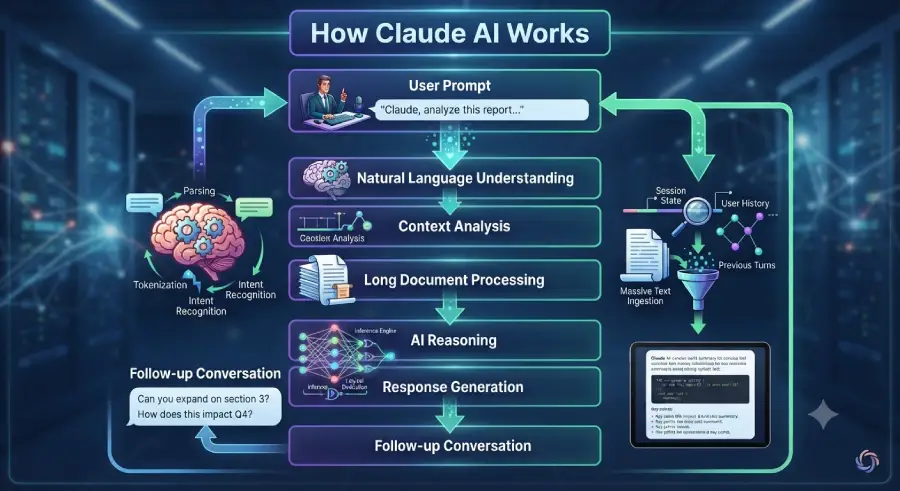
How Claude AI Works
Using Claude feels simple on the surface, but several processes run behind that simplicity. A rough workflow looks like: prompt → natural language understanding → context analysis → document processing → reasoning and organization → response generation → follow-up conversation.
Step 1: Natural Language Understanding
Claude starts by analyzing the request itself not just the keywords in it, but the intent, context, goals, and desired outcome behind it. A prompt like “create a beginner-friendly guide explaining cybersecurity risks for small businesses” gets interpreted for audience, subject matter, and expected format before any response gets generated.
Step 2: Context Analysis
Claude tracks conversational context to support natural follow-ups. If someone asks for “a marketing plan for a startup” and then says “make it suitable for a limited budget,” Claude reads that as a modification of the original request, not a brand-new topic which is what makes back-and-forth conversation feel natural instead of repetitive.
Step 3: Long Document Processing
Claude is particularly useful for working through research papers, reports, whitepapers, business documents, policy documents, and technical manuals analyzing and summarizing complex material while flagging what actually matters. That’s a big part of why it’s popular with professionals who regularly handle lengthy documentation.
Step 4: Reasoning and Organization
After parsing the request, Claude organizes the response into a structured format. Asked to “compare different content marketing strategies for SaaS businesses,” it might break the answer into sections on SEO, email marketing, social media, video, lead generation, cost, and long-term benefits a structure that makes the information easier to actually use.
Step 5: Response Generation
Finally, Claude generates a response shaped to the request summaries, guides, checklists, outlines, reports, tables, brainstorms, action plans, or code examples. The goal isn’t just handing over information; it’s helping the person actually complete the task or make a decision.
Key Features of Claude AI
Conversational AI: natural back-and-forth without needing complex search syntax or technical commands.
Writing assistance: blog posts, reports, emails, marketing copy, product descriptions, proposals, and outlines.
Long-form content support: whitepapers, research reports, e-books, and technical or business documentation.
Coding assistance: explaining code, generating samples, debugging, and exploring new frameworks (testing and verification still matter for anything AI-generated).
Research support: organizing information, summarizing findings, and identifying themes generally a starting point before consulting authoritative sources, not a replacement for them.
Brainstorming: ideas for content marketing, product launches, business growth, campaigns, and creative projects.
Productivity: project planning, meeting agendas, document drafting, and workflow organization.
Why Claude AI Matters for the Bigger Picture
Claude is part of a broader move toward conversational AI and AI-powered search. As people increasingly expect a direct answer instead of a list of links, assistants like Claude are becoming central to how people learn, research, and work online. This shift is covered further in How AI Is Changing User Search Behavior in 2026 and Why Users Are Switching from Google Search to AI Chatbots.
Claude AI vs. ChatGPT
Claude and ChatGPT are both highly capable assistants writing, summarizing, coding, brainstorming, and explaining complex topics are strengths for each. Where they differ is emphasis. Claude tends to get singled out for reasoning, clear writing style, and long-document handling; ChatGPT is widely used for conversational problem-solving, creative writing, coding help, and broad research workflows.
| Feature | Claude AI | ChatGPT |
| Conversational AI | Excellent | Excellent |
| Writing Assistance | Excellent | Excellent |
| Long Document Analysis | Excellent | Very Good |
| Coding Support | Very Good | Excellent |
| Brainstorming | Excellent | Excellent |
| Research | Very Good | Excellent |
| Best For | Writing, reasoning, document analysis | Writing, coding, research, productivity |
Lean toward Claude for: long-form writing, summarizing research papers, reviewing reports, business documentation, brainstorming, and project planning think a business analyst uploading a lengthy market report and asking for an executive briefing.
Lean toward ChatGPT for: coding projects, long-form content creation, marketing strategy, research assistance, and interactive problem-solving. For a full breakdown, see ChatGPT Search Explained.
Claude AI vs. Google Gemini
Both are advanced conversational assistants, but they play to different strengths Claude leans into thoughtful writing, reasoning, and document analysis, while Gemini leans into multimodal capability and deep integration with Google’s ecosystem.
| Feature | Claude AI | Google Gemini |
| Writing | Excellent | Excellent |
| Long Document Analysis | Excellent | Very Good |
| Coding | Very Good | Excellent |
| Multimodal Capabilities | Good | Excellent |
| Research | Very Good | Excellent |
| Best For | Writing-intensive tasks | Multimodal productivity and creativity |
Choose Claude for long reports, technical documents, research papers, and heavy writing work. Choose Gemini for image understanding, multimodal interactions, and tighter Google ecosystem integration. Full comparison: Google Gemini Explained.
Claude AI vs. Microsoft Copilot
These serve fairly different audiences. Copilot is built around workplace productivity inside Microsoft’s own applications; Claude is built around conversational reasoning, writing, and information analysis independent of any particular office suite.
| Feature | Claude AI | Microsoft Copilot |
| Writing | Excellent | Excellent |
| Business Documents | Excellent | Excellent |
| Coding | Very Good | Excellent |
| Research | Very Good | Good |
| Office Integration | Limited | Excellent |
| Long Document Analysis | Excellent | Good |
| Best For | Knowledge work and writing | Microsoft ecosystem users |
Use Claude if your daily work is writing reports, reviewing contracts, summarizing documentation, or strategic planning. Use Copilot if you live inside Word, Excel, PowerPoint, and Outlook day to day. Full comparison: Microsoft Copilot Explained.
Claude AI vs. Perplexity AI
These two take genuinely different approaches to information. Perplexity is built around search and source-backed research; Claude is built around reasoning, writing, and structured conversation.
| Feature | Claude AI | Perplexity AI |
| Conversational AI | Excellent | Excellent |
| Research | Very Good | Excellent |
| Source Citations | Limited, depending on the experience | Excellent |
| Writing | Excellent | Good |
| Long Document Analysis | Excellent | Good |
| Best For | Writing and analysis | Research and source discovery |
Choose Perplexity if you specifically need referenced information, academic research, or fact verification across multiple sources. Choose Claude if you need writing, summarization, strategic planning, or long-form analysis. Full comparison: Perplexity AI Explained.
Claude AI vs. Traditional Search
A traditional search engine helps you locate websites. Claude helps you understand information, organize ideas, and actually complete a task.
| Traditional Search | Claude AI |
| Keyword searches | Natural language conversations |
| List of webpages | AI-generated responses |
| Manual information gathering | Organized summaries |
| Independent searches | Context-aware discussions |
| Multiple browser tabs | Single conversational workflow |
| User analyzes information | AI assists with organization |
Traditional search: search “best content marketing strategy” → open several sites → read → take notes → write your own strategy.
Claude: ask for a complete content marketing strategy with SEO, content calendar, email, social, KPIs, and budget considerations in one prompt → Claude generates a structured plan → refine through follow-ups.
That conversational workflow can meaningfully cut the time between research and execution. For more on this broader shift, see AI Search vs Traditional Search.
Best Use Cases for Claude AI
Writers
Drafting, editing, improving readability, outlining, rewriting, and brainstorming many bloggers and content marketers use Claude to speed up drafting while still adding their own expertise and fact-checking before anything goes live.
Students
Summarizing notes, explaining difficult topics, building revision guides, generating practice questions, and organizing research best treated as a learning aid, not a substitute for independent study or original work.
Researchers
Reviewing large reports, identifying key themes, organizing findings, and simplifying technical material with important conclusions always checked against primary, authoritative sources.
Developers
Explaining code, debugging, generating examples, comparing approaches, and learning new tools with the standard caveat that AI-generated code needs review and testing before it ships.
Business Professionals
Strategic planning, meeting prep, proposal drafting, report summarization, and process documentation.
Digital Marketers
Campaign brainstorming, email copy, content calendars, SEO strategy development, and keyword research organization a useful starting point for outlining articles, with human expertise still driving originality, accuracy, and editorial quality.
Benefits of Claude AI
Strong writing support: Structured, coherent, readable output across a wide range of audiences and formats.
Solid reasoning: Breaking complex topics into logical explanations useful for research, education, and business analysis.
Long-document processing: Efficient summarization and analysis of lengthy reports and technical material.
Productivity gains: Less repetitive work drafting proposals or organizing notes.
Natural conversation: Maintained context lets people refine ideas through follow-ups instead of restating everything each time.
Limitations of Claude AI
Responses can contain errors. Like any AI assistant, Claude can occasionally produce inaccurate, incomplete, or outdated information verify anything that matters before acting on it, especially for legal, financial, or medical decisions.
Human review is essential. AI-generated writing should always be reviewed, edited, and fact-checked before publication or professional use.
Feature availability varies. Capabilities can depend on account type, subscription level, and product updates check current documentation for what’s actually available.
Not a substitute for expertise. Claude is a capable assistant, not a replacement for professional judgment or domain expertise.
What This Means for Publishers
As conversational AI keeps reshaping how people find information, a few adjustments are worth making to content strategy.
Lean Into Experience-Driven Content
AI systems increasingly favor original, genuinely helpful content over generic summaries detailed guides, tutorials, case studies, and practical insight that demonstrate real expertise tend to hold up better.
Build Real Topic Clusters
An AI Search content hub works best when it’s genuinely interconnected pieces like What Is AI Search?, How AI Search Works, Best AI Search Engines in 2026, and Google AI Mode Explained reinforcing each other rather than sitting in isolation.
Answer High-Intent Questions Directly
Concise, direct answers to questions like “What is Claude AI?”, “Is Claude AI free?”, “Claude AI vs ChatGPT” improve the reader experience and support visibility in AI-powered search.
Frequently Asked Questions
What is Claude AI?
Claude AI is a conversational assistant developed by Anthropic that helps people write content, summarize documents, answer questions, brainstorm, analyze information, assist with code, and generally improve productivity through natural language.
How does Claude AI work?
It interprets natural language prompts, reads intent and conversational context, processes large amounts of information, applies reasoning to organize a response, and supports follow-up questions without requiring the person to repeat context.
Is Claude AI free?
Claude offers a free tier with core functionality; additional capabilities and higher usage limits are generally available on paid plans. Features change over time, so check Anthropic’s current plans for specifics.
Is Claude AI better than ChatGPT?
Neither is universally better they’re strong in different areas. Claude tends to stand out for long-form writing, document analysis, summarization, and structured reasoning; ChatGPT is especially strong for coding, research, creative writing, and broad conversational workflows. Many people use both, depending on the task.
Can Claude AI search the web?
Depending on the plan and product version, Claude may support web-enabled capabilities for current information availability varies, so check current feature documentation.
Can Claude AI summarize long documents?
Yes, this is one of its most consistently noted strengths, useful for reports, research papers, contracts, and technical documentation.
Can Claude AI write code?
Yes, including generating samples, explaining concepts, debugging, and comparing approaches with the same caveat as any AI-generated code: review and test before using it in production.
Is Claude AI good for students?
Yes, as a learning aid explaining concepts, summarizing material, building practice questions, and organizing research. Students should still verify information independently and follow their institution’s academic integrity policies.
Is Claude AI accurate?
Generally well-structured and helpful, but like any AI assistant it can occasionally get things wrong. Verify anything involving legal, medical, financial, or otherwise consequential decisions against authoritative sources.
How is Claude AI different from traditional search engines?
Traditional search helps you find webpages. Claude helps you understand information, generate content, and organize ideas directly, without necessarily sending you elsewhere first.
Key Takeaways
- Claude AI is a conversational assistant from Anthropic built for writing, research, productivity, and knowledge work
- It’s particularly strong with long documents, summarization, and structured, well-organized content
- It supports writers, students, researchers, developers, marketers, and business professionals
- AI-generated content should always be reviewed, edited, and fact-checked before publication or important decisions
- Strong topical authority and original insight remain essential for visibility in both traditional and AI-powered search
- Understanding tools like Claude helps readers adapt to genuinely changing search behavior
Conclusion
Claude AI has built a real following by focusing on thoughtful reasoning, clear communication, and practical productivity. Whether it’s writing, analyzing reports, brainstorming, learning something new, or planning a project, it offers genuinely useful assistance through natural conversation with one of its clearest strengths being how it organizes complex information into something structured and easy to actually use.
That said, Claude is best treated as a collaborative assistant, not a replacement for human expertise. Reviewing its output, verifying facts, and applying real judgment still matter.
For publishers, the rise of tools like Claude reinforces a broader pattern worth planning around: readers increasingly expect direct, well-organized, trustworthy answers. Comprehensive topic clusters, original content, and solid internal linking see PostDune’s guides on ChatGPT Search Explained, Google Gemini Explained, and Perplexity AI Explained for the rest of the platform comparison series will help maintain visibility across both traditional and AI-powered search.